
Nissan Maxima Service and Repair Manual: Basic inspection
DIAGNOSIS AND REPAIR WORK FLOW
Work Flow
OVERALL SEQUENCE
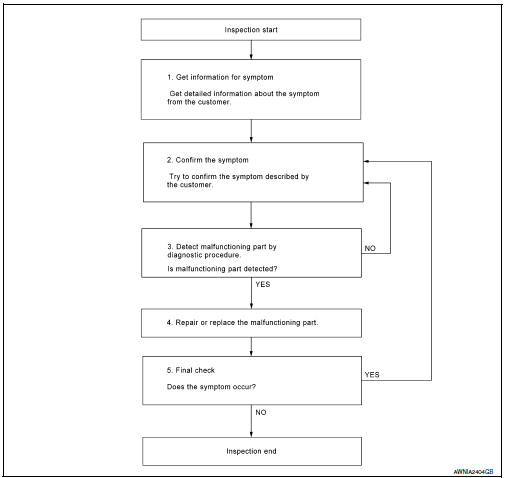
DETAILED FLOW
1.GET INFORMATION FOR SYMPTOM
Get detailed information from the customer about the symptom (the condition and the environment when the incident/malfunction occurred).
2.CONFIRM THE SYMPTOM
Try to confirm the symptom described by the customer. Verify relation between the symptom and the condition when the symptom is detected. Refer to SE-51, "Symptom Table".
3.DETECT MALFUNCTIONING PART BY DIAGNOSTIC PROCEDURE
Inspect according to Diagnostic Procedure of the system.
4.REPAIR OR REPLACE THE MALFUNCTIONING PART
- Repair or replace the malfunctioning part.
- Reconnect parts or connectors disconnected during Diagnostic Procedure.
5.FINAL CHECK
Refer to confirmed symptom in step 2, and make sure that the symptom is not detected.
 Seat
Seat
...
 System description
CLIMATE CONTROLLED SEAT SYSTEM
System Diagram
System Description
The climate controlled seat system is controlled by the climate
controlled seat control unit.
Operation of the climate co ...
Other materials:
ADP branch line circuit
Diagnosis Procedure
1.CHECK CONNECTOR
Turn the ignition switch OFF.
Disconnect the battery cable from the negative terminal.
Check the following terminals and connectors for damage, bend and
loose connection (unit side and connector
side).
Driver seat control unit
Harness connec ...
Daytime running light system
The LED portion of the headlights automatically
illuminate at 100% intensity when the engine is
started and the parking brake released. The daytime
running lights operate with the headlight
switch in the OFF position. When you turn the
headlight switch to the position for
full
illumination t ...
NISSAN Vehicle Immobilizer System keys
You can only drive your vehicle using the Intelligent
Keys which are registered to the NISSAN
Vehicle Immobilizer System components in your
vehicle.
The mechanical key can be used for all the locks.
Never leave the keys in the vehicle.
Additional or replacement keys:
If you still have a key ...
Nissan Maxima Owners Manual
- Illustrated table of contents
- Safety-Seats, seat belts and supplemental restraint system
- Instruments and controls
- Pre-driving checks and adjustments
- Monitor, climate, audio, phone and voice recognition systems
- Starting and driving
- In case of emergency
- Appearance and care
- Do-it-yourself
- Maintenance and schedules
- Technical and consumer information
Nissan Maxima Service and Repair Manual

0.0077