
Nissan Maxima Service and Repair Manual: System description
CLIMATE CONTROLLED SEAT SYSTEM
System Diagram
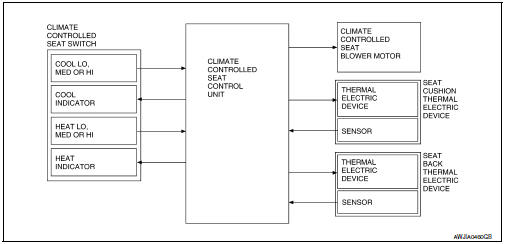
System Description
- The climate controlled seat system is controlled by the climate controlled seat control unit.
- Operation of the climate controlled seat switch sends heated or cooled airflow and adjusts the seat temperature.
SEAT CUSHION AND SEATBACK TEMPERATURE ADJUSTMENT FUNCTION
- A thermal electric device (TED) unit is installed in the seat cushion and seatback. The device heats or cools, sends airflow to the seat surface, and adjusts the seat temperature.
- The thermal electric device (TED) is a heat exchanger that has a function to heat or cool the airflow from the climate controlled seat blower motor. By changing the direction of the current from the power supply, the device takes or gives heat, and adjusts the heat exchange process depending on voltage.
NOTE:
The climate controlled seat blower motor maintains low speed for approximately 60 seconds after turning the climate controlled seat switch off.
CAUTION:
- The thermal electric device has a dual-climate function that allows one side to operate at a high temperature and the other to operate at a low temperature simultaneously.
- Before starting work, always turn OFF the switch and check that the thermal electric device is cold.
FAIL-SAFE
The fail-safe function is adopted for the climate controlled seat control unit. Refer to SE-26, "Fail-safe".
Component Parts Location
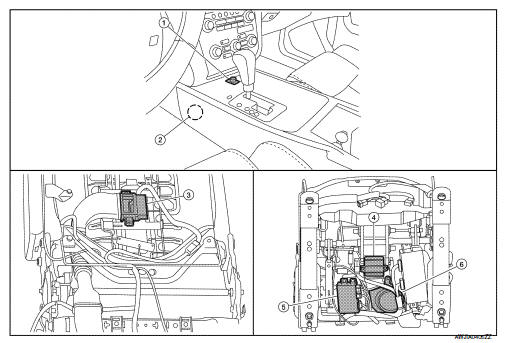
- Climate controlled seat switch M302
- Climate controlled seat relay M58
- Seatback thermal electric device B218
- Seat cushion thermal electric device B219
- Climate controlled seat control unit B212, B216, B217
- Climate controlled seat blower motor B220
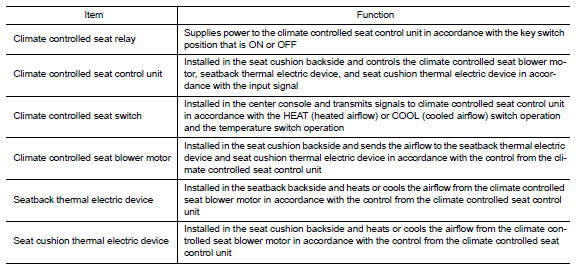
Component Description
 Basic inspection
DIAGNOSIS AND REPAIR WORK FLOW
Work Flow
OVERALL SEQUENCE
DETAILED FLOW
1.GET INFORMATION FOR SYMPTOM
Get detailed information from the customer about the symptom (the condition
and the envir ...

Other materials:
Wiring diagram
POWER WINDOW SYSTEM
Wiring Diagram
...
Aux image signal circuit
Description
Transmits the image signal of AUX device from auxiliary input jacks to
AV control unit.
AV control unit transmits the image signal that is input to the
display unit.
Diagnosis Procedure
1.CHECK CONTINUITY AUX IMAGE SIGNAL CIRCUIT
Turn ignition switch OFF.
Disconnect ...
Warning signals
To help prevent the vehicle from moving unexpectedly
by erroneous operation of the Intelligent
Key or to help prevent the vehicle from being
stolen, a chime or buzzer sounds from inside and
outside the vehicle and a warning is displayed in
the instrument panel.
When a chime or beep sounds or ...
Nissan Maxima Owners Manual
- Illustrated table of contents
- Safety-Seats, seat belts and supplemental restraint system
- Instruments and controls
- Pre-driving checks and adjustments
- Monitor, climate, audio, phone and voice recognition systems
- Starting and driving
- In case of emergency
- Appearance and care
- Do-it-yourself
- Maintenance and schedules
- Technical and consumer information
Nissan Maxima Service and Repair Manual

0.0081