
Nissan Maxima Service and Repair Manual: Sound signal circuit
SATELLITE RADIO TUNER
SATELLITE RADIO TUNER : Description
Left and right channel audio signals are supplied from the satellite radio tuner to the AV control unit through the sound signal circuits.
SATELLITE RADIO TUNER : Diagnosis Procedure
LEFT CHANNEL
1.CHECK HARNESS
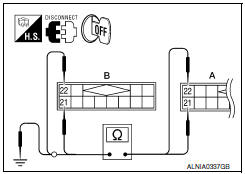
- Turn ignition switch OFF.
- Disconnect satellite radio tuner (factory installed) connector B111 and AV control unit connector M116.
- Check continuity between satellite radio tuner (factory installed) connector B111 (A) and AV control unit connector M116 (B).
- Check continuity between satellite radio tuner (factory installed) connector B111 (A) and ground.
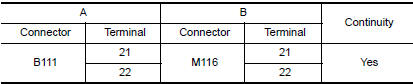
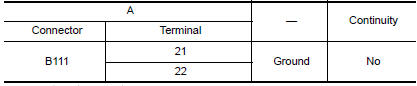
2.CHECK LEFT CHANNEL AUDIO SIGNAL
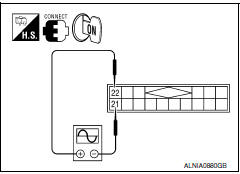
- Connect satellite radio tuner (factory installed) and AV control unit.
- Turn ignition switch ON.
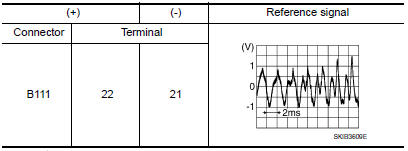
- Check signal between satellite radio tuner (factory installed) connector B111 terminals 21 and 22 with CONSULT or oscilloscope.
RIGHT CHANNEL
1.CHECK HARNESS
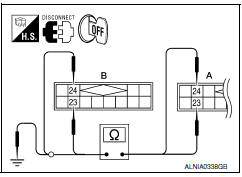
- Turn ignition switch OFF.
- Disconnect satellite radio tuner (factory installed) connector B111 and AV control unit connector M116.
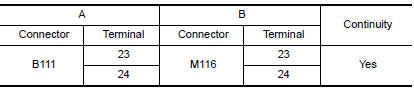
- Check continuity between satellite radio tuner (factory installed) B111 (A) and AV control unit M116 (B).
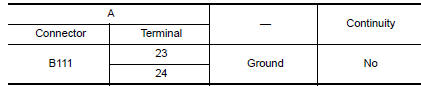
- Check continuity between satellite radio tuner (factory installed) connector B111 (A) and ground.
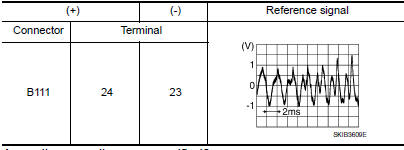
2.CHECK RIGHT CHANNEL AUDIO SIGNAL
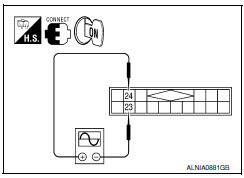
- Connect satellite radio tuner (factory installed) and AV control unit.
- Turn ignition switch ON.
- Check signal between satellite radio tuner (factory installed) connector B111 terminals 23 and 24 with CONSULT or oscilloscope.
 Communication signal circuit
SATELLITE RADIO TUNER
SATELLITE RADIO TUNER : Description
Communication signals are exchanged between the AV control unit and satellite
radio tuner using the communication circuits.
SATELLITE RAD ...
 Microphone signal circuit
Description
Voice signals are transmitted from the microphone to the Bluetooth control
unit using the microphone signal circuits.
Diagnosis Procedure
1.CHECK HARNESS BETWEEN BLUETOOTH CONTROL UNI ...
Other materials:
Active ride control
This system senses upper body motion (based
on wheel speed information) and controls engine
torque and four wheel brake pressure. This will
enhance ride comfort in effort to restrain uncomfortable
upper body movement when passing
over undulated road surfaces. This system
comes into effect abov ...
Rear view monitor system
System Diagram
System Description
When the shift selector is in the R position, the display shows a view to the
rear of the vehicle. Lines which indicate the vehicle clearance and distances
are also displayed.
Component Parts Location
Tweeter LH M143
Tweeter RH M144
AV control ...
Oil cooler
Removal and Installation
Oil filter
Oil cooler bolt
Water pipe
Water hose
Oil cooler
O-ring
Oil pan
Water pipe
Relief valve
Water drain plug
Copper gasket
Water connector Engine coolant flow
WARNING: Be car ...
Nissan Maxima Owners Manual
- Illustrated table of contents
- Safety-Seats, seat belts and supplemental restraint system
- Instruments and controls
- Pre-driving checks and adjustments
- Monitor, climate, audio, phone and voice recognition systems
- Starting and driving
- In case of emergency
- Appearance and care
- Do-it-yourself
- Maintenance and schedules
- Technical and consumer information
Nissan Maxima Service and Repair Manual

0.0077