
Nissan Maxima Service and Repair Manual: Climate controlled seat switch indicator
Description
Illuminates the climate controlled seat switch to indicate operating status.
Component Function Check
1.CHECK CLIMATE CONTROLLED SEAT SWITCH INDICATOR FUNCTION
Check that the indicators for the climate controlled seat switch operate in both COOL and HEAT modes.
Diagnosis Procedure
Regarding Wiring Diagram information, refer to SE-44, "Wiring Diagram".
1.CHECK CLIMATE CONTROLLED SEAT SWITCH INDICATOR
Perform climate controlled seat switch indicator component inspection. Refer to SE-24, "Component Inspection (Climate Controlled Seat Switch Indicator)".
2.CHECK CLIMATE CONTROLLED SEAT SWITCH COOL INDICATOR CIRCUIT
- Turn ignition switch OFF.
- Disconnect climate controlled seat switch connector and climate controlled seat control unit connector B216.
- Check continuity between climate controlled seat switch connector M302 (A) terminal 4 and climate controlled seat control unit connector B216 (B) terminal 19.
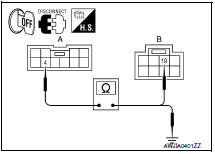
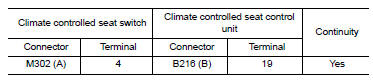
4. Check continuity between climate controlled seat switch connector M302 (A) terminal 4 and ground.

3.CHECK CLIMATE CONTROLLED SEAT SWITCH HEAT INDICATOR CIRCUIT
1. Check continuity between climate controlled seat switch connector M302 (A) terminal 5 and climate controlled seat control unit connector B216 (B) terminal 20.
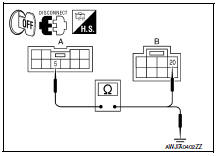
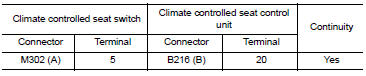
2. Check continuity between climate controlled seat switch connector M302 (A) terminal 5 and ground.

4.CHECK CLIMATE CONTROLLED SEAT SWITCH INDICATOR GROUND CIRCUIT
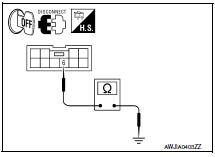
Check continuity between climate controlled seat switch connector M302 terminal 6 and ground.

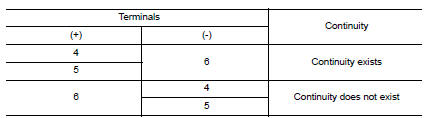
Component Inspection (Climate Controlled Seat Switch Indicator)
1.CHECK CLIMATE CONTROLLED SEAT SWITCH
- Disconnect climate controlled seat switch connector.
- Check continuity between climate controlled seat switch terminals.
 Climate controlled seat switch
Description
Provides inputs to the climate controlled seat control unit for climate
controlled seat operation.
Component Function Check
1.CHECK CLIMATE CONTROLLED SEAT SWITCH FUNCTION
Turn the c ...
 ECU diagnosis information
CLIMATE CONTROLLED SEAT CONTROL UNIT
Reference Value
TERMINAL LAYOUT
PHYSICAL VALUES
Fail-safe
Climate controlled seat control unit equips fail-safe function.
When a malfunction occurs ...
Other materials:
Trunk lid
TRUNK LID ASSEMBLY
TRUNK LID ASSEMBLY : Removal and Installation
CAUTION:
Use two people when removing or installing trunk lid assembly
due to its heavy weight.
Use protective tape or shop cloths to protect surrounding
components from damage during removal
and installation of tr ...
Diagnosis system (ipdm E/R)
Diagnosis Description
AUTO ACTIVE TEST
Description
In auto active test mode, the IPDM E/R sends a drive signal to the following
systems to check their operation.
Oil pressure warning lamp
Front wiper (LO, HI)
Parking lamps
Side marker lamps
License plate lamps
Tail lamps
Front f ...
U1001 can comm circuit
Description
CAN (Controller Area Network) is a serial communication line for real time
application. It is an on-vehicle multiplex
communication line with high data communication speed and excellent error
detection ability. Many electronic
control units are equipped onto a vehicle, and each ...
Nissan Maxima Owners Manual
- Illustrated table of contents
- Safety-Seats, seat belts and supplemental restraint system
- Instruments and controls
- Pre-driving checks and adjustments
- Monitor, climate, audio, phone and voice recognition systems
- Starting and driving
- In case of emergency
- Appearance and care
- Do-it-yourself
- Maintenance and schedules
- Technical and consumer information
Nissan Maxima Service and Repair Manual

0.0126