
Nissan Maxima Service and Repair Manual: Combination switch system symptoms
SYMPTOM DIAGNOSIS
COMBINATION SWITCH SYSTEM SYMPTOMS
Symptom Table
- Perform the data monitor of CONSULT to check for any malfunctioning item.
- Check the malfunction combinations
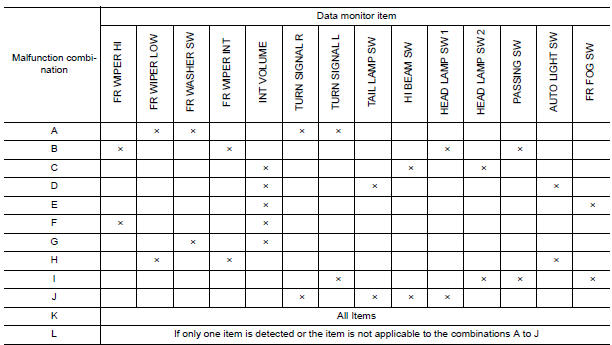
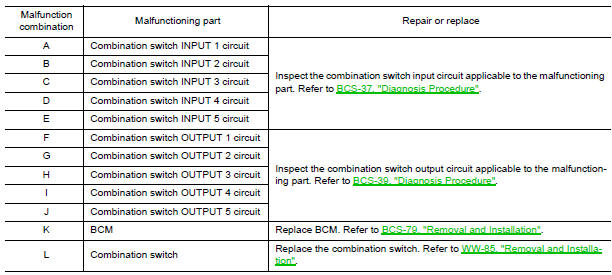
- Identify the malfunctioning part from the agreed combination and repair or replace the part.
 Wiring diagram
BCM (BODY CONTROL MODULE)
Wiring Diagram
...
 Precautions
PRECAUTION
Precaution for Supplemental Restraint System (SRS) "AIR BAG" and
"SEAT BELT PRE-TENSIONER "
The Supplemental Restraint System such as "AIR BAG" and "S ...
Other materials:
How to switch the display
With the ignition switch in the ON position, press
the CAMERA button or move the shift lever to the
R (Reverse) position to operate the Around
View Monitor.
The Around View Monitor displays different
split screen views depending on the position of
the shift lever. Press the CAMERA button to
...
P0442 evap control system
DTC Logic
DTC DETECTION LOGIC
This diagnosis detects leakage in the EVAP purge line using engine intake
manifold vacuum.
If pressure does not increase, the ECM will check for leakage in the line
between the fuel tank and EVAP canister
purge volume control solenoid valve, under the followi ...
Adjusting the screen
1. Touch the touch-screen display with the
Around View Monitor on.
2. Touch the "Brightness," "Contrast," "Tint,"
"Color," or "Black Level" key.
3. Adjust the item by touching the + or - key
on the touch-screen display.
NOTE:
Do not adjust any of the display settings of
the Around Vi ...
Nissan Maxima Owners Manual
- Illustrated table of contents
- Safety-Seats, seat belts and supplemental restraint system
- Instruments and controls
- Pre-driving checks and adjustments
- Monitor, climate, audio, phone and voice recognition systems
- Starting and driving
- In case of emergency
- Appearance and care
- Do-it-yourself
- Maintenance and schedules
- Technical and consumer information
Nissan Maxima Service and Repair Manual

0.0079