
Nissan Maxima Service and Repair Manual: Subwoofer
Removal and Installation
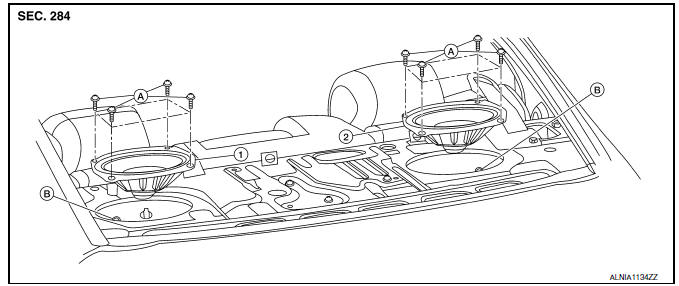
- Subwoofer (LH)
- Subwoofer (RH)
- Subwoofer screws
- Subwoofer connectors
REMOVAL
- Remove the rear parcel shelf finisher. Refer to INT-28, "Removal and Installation".
- Remove the subwoofer screws.
- Pull out the subwoofer, disconnect the harness connector from the subwoofer and remove.
INSTALLATION
Installation is in the reverse order of removal.
 Rear door speaker
Removal and Installation
REMOVAL
Remove the rear door finisher. Refer to INT-21, "Removal and
Installation".
Remove the rear door speaker screws (A).
Disconnect the harness c ...
 Bose speaker AMP\
Removal and Installation
Bose speaker amp.
Screws
REMOVAL
NOTE:
If removing the BOSE speaker amp. bracket, it is necessary to remove the parcel
shelf finisher. The BOSE
speaker am ...
Other materials:
Lifting motor (front)
Description
The lifting motor (front) is installed to the seat frame.
The lifting motor (front) is activated with the driver seat
control unit.
The lifter (front) is moved upward/downward by changing the rotation
direction of lifting motor (front).
Component Function Check
1. CHECK ...
Roof side molding
Exploded View
Roof side molding
Roof panel
Body side panel
Roof side molding clip
Removal and Installation
REMOVAL
Using suitable tool, lift and twist the roof side molding up from
the rear edge, working forward.
Disengage each roof side molding clip, then remove the ...
Checking engine oil level
1. Park the vehicle on a level surface and apply
the parking brake.
2. Start the engine and let it idle until it reaches
operating temperature.
3. Turn off the engine. Wait more than
10 minutes for the oil to drain back into
the oil pan.
4. Remove the dipstick and wipe it clean. Rei ...
Nissan Maxima Owners Manual
- Illustrated table of contents
- Safety-Seats, seat belts and supplemental restraint system
- Instruments and controls
- Pre-driving checks and adjustments
- Monitor, climate, audio, phone and voice recognition systems
- Starting and driving
- In case of emergency
- Appearance and care
- Do-it-yourself
- Maintenance and schedules
- Technical and consumer information
Nissan Maxima Service and Repair Manual

0.0113