
Nissan Maxima Service and Repair Manual: Rear stabilizer
Removal and Installation
Removal
- Remove each rear stabilizer connecting rod nut using power tools.
- Disconnect the rear stabilizer from each rear stabilizer connecting rod.
- Remove each rear stabilizer clamp bolt using power tools.
- Remove the rear stabilizer.
- If necessary, remove each rear stabilizer clamp.
- If necessary, remove each rear stabilizer bushing.
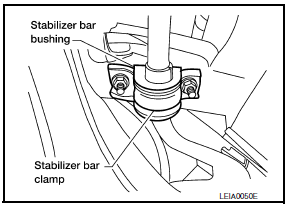
Installation
Installation is in the reverse order of removal.
- Make sure each slit in the surface of each rear stabilizer bushing faces the rear of the vehicle.
- Use a wrench to hold each rear stabilizer connecting rod ball stud while tightening each rear stabilizer connecting rod nut.
 Radius rod
Removal and Installation
Removal
Remove the rear wheel and tire using power tool. Refer to WT-60,
"Adjustment".
Remove the radius rod nut and bolt from the rear axle housing
using power t ...
 Suspension ARM
Removal and Installation
Removal
Remove the rear suspension member. Refer to RSU-16, "Removal and
Installation".
Remove the connecting rod mount bracket nut and bolt from the rear
suspens ...
Other materials:
Intelligent Cruise Control (ICC) (if so equipped)
WARNING
Failure to follow the warnings and instructions
for proper use of the ICC system
could result in serious injury or death.
The ICC system is only an aid to assist
the driver and is not a collision warning
or avoidance device. It is the driver's
responsibility to stay alert, drive ...
Multifunction switch
Removal and Installation
REMOVAL
Remove cluster lid D. Refer to IP-18, "Removal and Installation".
Remove the four multifunction switch screws (A) and the multifunction
switch (2) from cluster lid D (1).
: Metal clip
INSTALLATION
Installation is in the reverse order of ...
Sunload sensor
Removal and Installation
REMOVAL
Remove the front LH speaker grille from the instrument panel.
Refer to IP-10, "Exploded View".
Disconnect the harness connector from the sunload sensor.
Release the sunload sensor tabs and remove the sunload sensor
(1) from the front LH speake ...
Nissan Maxima Owners Manual
- Illustrated table of contents
- Safety-Seats, seat belts and supplemental restraint system
- Instruments and controls
- Pre-driving checks and adjustments
- Monitor, climate, audio, phone and voice recognition systems
- Starting and driving
- In case of emergency
- Appearance and care
- Do-it-yourself
- Maintenance and schedules
- Technical and consumer information
Nissan Maxima Service and Repair Manual

0.039