
Nissan Maxima Service and Repair Manual: Magnet clutch
Description
SYSTEM DESCRIPTION
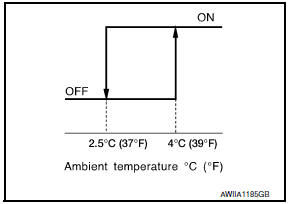
A/C auto amp. controls A/C compressor operation by ambient temperature and signal from ECM.
Low Temperature Protection Control A/C auto amp. will turn the A/C compressor ON or OFF as determined by a signal detected by ambient sensor.
When ambient temperature is greater than 4C (39F), the A/C compressor turns ON. The A/C compressor turns OFF when ambient temperature is less than 2.5C (37F).
Component Function Check
1.FUNCTION INSPECTIONS
- Press AUTO switch. AUTO is indicated on the display.
- Press the A/C switch.
- Check that the indicator of the A/C switch turns on. Check visually and by sound that the compressor is operating. (The discharge air temperature or fan speed varies depending on the ambient temperature, invehicle temperature, and temperature setting.)
- Press the A/C switch again.
- Check that the indicator of the A/C switch turns OFF. Check visually and by sound that the compressor stops.
Diagnosis Procedure
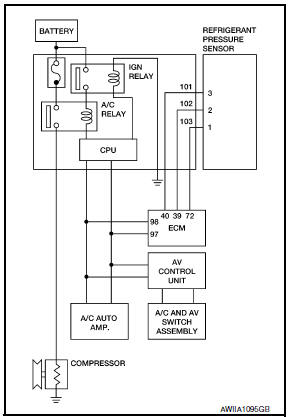
SYMPTOM: Magnet clutch does not engage when A/C switch is ON.
1.INSPECTION IN AUTO ACTIVE TEST MODE
Perform "AUTO ACTIVE TEST".
2.CHECK POWER SUPPLY FOR A/C COMPRESSOR
- Turn ignition switch OFF.
- Disconnect A/C compressor connector.
- Start engine and press A/C switch.
- Check voltage between A/C compressor harness connector F3 terminal 1 and ground

3.CHECK FUSE
Check 10A fuse (No. 41).
4.CHECK CIRCUIT CONTINUITY BETWEEN A/C RELAY IN IPDM E/R AND A/C COMPRESSOR
- Turn ignition switch OFF.
- Disconnect IPDM E/R connector F10 and A/C compressor connector F3.
- Check continuity between A/C compressor harness connector F3 (A) terminal 1 and IPDM E/R harness connector F10 (B) terminal 48.
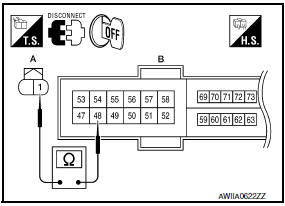
1 - 48: Continuity should exist.
5.CHECK A/C COMPRESSOR CIRCUIT FOR SHORT
Check continuity between A/C compressor harness connector F3 terminal 1 and ground.
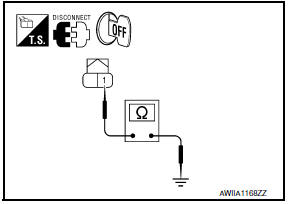
1 - Ground: Continuity should not exist.
6.CHECK WITH SELF-DIAGNOSIS FUNCTION OF CONSULT
- Using CONSULT, perform "SELF-DIAGNOSIS RESULTS" of HVAC.
- Check if any DTC No. is displayed in the self-diagnosis results.
NOTE: If DTC is displayed along with DTC U1000 or U1010, first diagnose the DTC U1000 or U1010.
7.CHECK A/C AUTO AMP. INPUT SIGNAL
Using CONSULT, check "On/Off" of "COMP REQ SIG" and "FAN REQ SIG" in "DATA MONITOR" of HVAC.
A/C SWITCH ON: COMP REQ SIG On
A/C SWITCH OFF: COMP REQ SIG Off
FAN CONTROL DIAL ON: FAN REQ SIG On
FAN CONTROL DIAL OFF: FAN REQ SIG Off
8.CHECK REFRIGERANT PRESSURE SENSOR
Check refrigerant pressure sensor.
 Blower motor
Description
COMPONENT DESCRIPTION
Brush-less Motor
The blower motor utilizes a brush-less motor with a rotating magnet.
Quietness is improved over previous motors where the brush was
the point ...
 Power supply and ground circuit
A/C AUTO AMP.
A/C AUTO AMP.: Description
COMPONENT DESCRIPTION
A/C Auto Amp. (Air Conditioner Automatic Amplifier)
The A/C auto amp. (1) has a built-in microcomputer that processes
information se ...
Other materials:
Combination meter
Reference Value
VALUES ON THE DIAGNOSIS TOOL
NOTE:
* The monitor will indicate "OFF" even though the brake warning
lamp is on if either of the following conditions exist:
The parking brake is engaged
The brake fluid level is low
TERMINAL LAYOUT
PHYSICAL VALUES
Fail Safe
...
C1110, C1153, C1170 ABS actuator and electric unit (control unit)
DTC Logic
DTC DETECTION LOGIC
DTC CONFIRMATION PROCEDURE
1.CHECK SELF-DIAGNOSIS RESULTS
Check the self-diagnosis results.
Diagnosis Procedure
1.REPLACE ABS ACTUATOR AND ELECTRIC UNIT (CONTROL UNIT)
CAUTION:
Replace ABS actuator and electric unit (control unit) when self-diagnostic
...
Precaution
PRECAUTIONS
Precaution for Supplemental Restraint System (SRS) "AIR BAG" and
"SEAT BELT PRE-TENSIONER"
The Supplemental Restraint System such as "AIR BAG" and "SEAT BELT
PRE-TENSIONER", used along with a front seat belt, helps to reduce the risk
or severity of injury to the driver and front ...
Nissan Maxima Owners Manual
- Illustrated table of contents
- Safety-Seats, seat belts and supplemental restraint system
- Instruments and controls
- Pre-driving checks and adjustments
- Monitor, climate, audio, phone and voice recognition systems
- Starting and driving
- In case of emergency
- Appearance and care
- Do-it-yourself
- Maintenance and schedules
- Technical and consumer information
Nissan Maxima Service and Repair Manual

0.0208