
Nissan Maxima Service and Repair Manual: Front door finisher
Exploded View
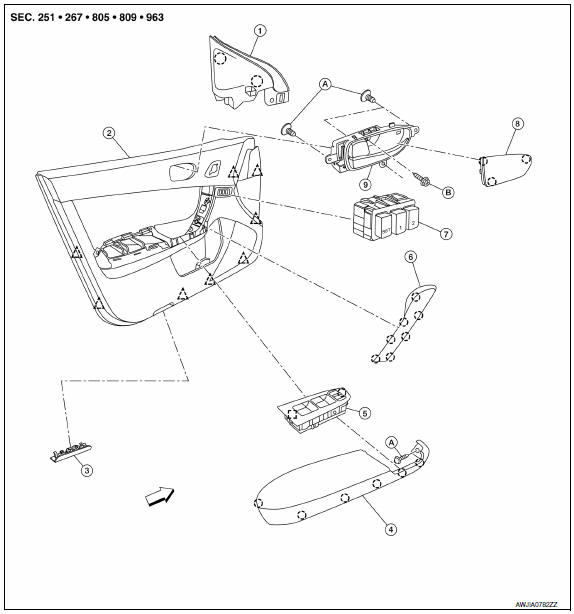
- Mirror cover
- Front door finisher
- Step lamp
- Arm rest finisher
- Main power window and door lock/ unlock switch finisher
- Front door grip cover
- Seat memory switch (if equipped)
- Inside release handle escutcheon
- Inside release handle
- Flat head screws
- Screws
 Front
Front
 Metal clip
 Pawl
Pawl
 Clip
Clip
Removal and Installation
REMOVAL
- Remove the step lamp
- Release the pawls at the rear edge and remove the inside release handle escutcheon, then remove the screw.
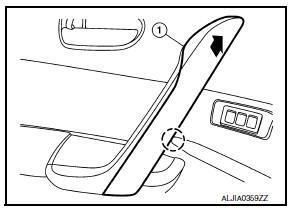
- Remove the front door grip cover (1) by using a suitable tool to release the pawls.
CAUTION:
- Use suitable tool to release at the point shown or damage may occur to the pawls.
- Lift upward on front door grip cover to release pawls and remove.
- Wrap the tip of a suitable tool with a cloth when removing metal clips from finisher.
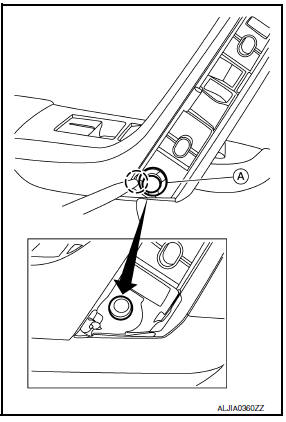
- Remove the front door grip clip (A).
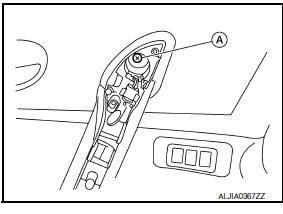
- Remove the front door grip screw (A).
- Remove the power window and door lock/unlock switch and finisher as an assembl
- Remove the front door finisher screw (A) under power window and door lock/unlock switch finisher.
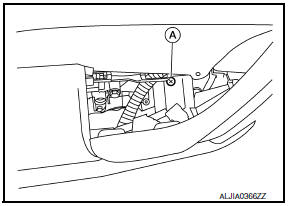
- Release the front door finisher clips using a suitable tool (A)
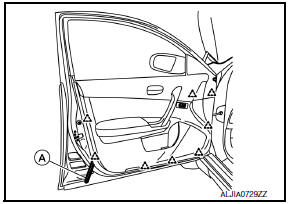
 : Clip
- Disconnect the harness connector from the seat memory switch (if equipped).
- Disconnect inside handle and lock knob cables from front door finisher.
- Disconnect the harness connector from the power window and door lock/unlock switch lamp.
- Remove the front door finisher.
INSTALLATION
Installation is in the reverse order of removal.
- If installing a new front door finisher, transfer all the necessary parts to the new front door finisher.

 Rear door finisher
Exploded View
Rear door finisher
Step lamp
Armrest finisher
Rear power window switch finisher
Inside release handle escutcheon
Inside release handle
Flat head screws
&nb ...
Other materials:
Meter control switch
Removal and Installation
REMOVAL
Disconnect the negative battery terminal. Refer
to PG-67, "Removal and Installation (Battery)".
Remove the cluster lid A. Refer to IP-16,
"Removal and Installation".
Detach the combination meter control switch
harnes ...
When traveling or registering in another country
When planning to drive your NISSAN vehicle
in another country, you should first find
out if the fuel available is suitable for your vehicle's
engine.
Using fuel with an octane rating that is too low
may cause engine damage. All gasoline vehicles
must be operated with unleaded gasoline. There ...
Instrument panel assembly
Exploded View
Center speaker grille (if equipped)
Tweeter speaker grille (LH)
Front defroster grille (LH)
Instrument panel
Instrument side finisher (LH)
Lower knee protector (LH)
Instrument lower panel (LH)
Fuse block cover
Steering column lower cover (power tilt)
Ste ...
Nissan Maxima Owners Manual
- Illustrated table of contents
- Safety-Seats, seat belts and supplemental restraint system
- Instruments and controls
- Pre-driving checks and adjustments
- Monitor, climate, audio, phone and voice recognition systems
- Starting and driving
- In case of emergency
- Appearance and care
- Do-it-yourself
- Maintenance and schedules
- Technical and consumer information
Nissan Maxima Service and Repair Manual

0.0111