
Nissan Maxima Service and Repair Manual: Reclining sensor
Description
- The reclining motor is installed to the seatback assembly.
- The pulse signal is input to the driver seat control unit when the reclining is operated.
- The driver seat control unit counts the pulse and calculates the reclining amount of the seat.
Component Function Check
1. CHECK FUNCTION
- Select "RECLN PULSE" in "DATA MONITOR" mode with CONSULT.
- Check reclining sensor signal under the following conditions

Diagnosis Procedure
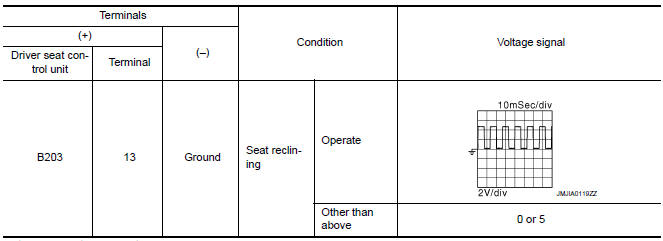
1. CHECK RECLINING SENSOR SIGNAL
- Turn ignition switch ON.
- Read voltage signal between driver seat control unit harness connector and ground with oscilloscope.
2. CHECK RECLINING SENSOR CIRCUIT
- Turn ignition switch OFF.
- Disconnect driver seat control unit and reclining motor.
- Check continuity between driver seat control unit harness connector and reclining motor harness connector.

- Check continuity between driver seat control unit harness connector and ground

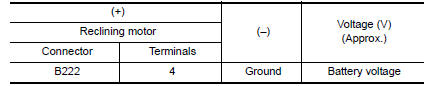
3. CHECK RECLINING SENSOR POWER SUPPLY
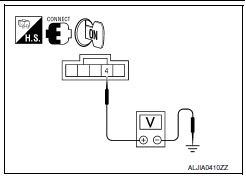
- Connect driver seat control unit.
- Turn ignition switch ON.
- Check voltage between reclining motor harness connector and ground.
4. CHECK RECLINING SENSOR POWER SUPPLY CIRCUIT
- Turn ignition switch OFF.
- Disconnect driver seat control unit.
- Check continuity between driver seat control unit harness connector and reclining motor harness connector.

- Check continuity between driver seat control unit harness connector and ground.

5. CHECK RECLINING SENSOR GROUND
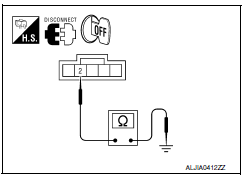
- Turn ignition switch OFF.
- Check continuity between reclining motor harness connector and ground

 Sliding sensor
Description
The sliding sensor is installed to the seat frame.
The pulse signal is input to the driver seat control unit when sliding
is performed.
The driver seat control unit counts the p ...
 Lifting sensor (front)
Description
The lifting sensor (front) is installed to the seat frame.
The pulse signal is input to the driver seat control unit when the
lifting (front) is operated.
The driver seat contro ...
Other materials:
Rear view monitor system
System Diagram
System Description
When the shift selector is in the R position, the display shows a view to the
rear of the vehicle. Lines which indicate the vehicle clearance and distances
are also displayed.
Component Parts Location
Tweeter LH M51
Center speaker M130
Tweeter ...
Ducts and grilles
Exploded View
Ducts
Side defroster nozzle (RH)
Front defroster nozzle
Side defroster nozzle (LH)
Upper ventilator duct
Heater and cooling unit assembly
Connector duct (LH)
Floor ventilator duct (LH)
Rear floor duct (LH)
Connector duct (center)
Rear ventilator duct (cen ...
Slip indicator lamp
Description
Component Function Check
1.CHECK SLIP INDICATOR LAMP OPERATION
Check that the lamp illuminates for approximately 2 seconds after the
ignition switch is turned ON.
Diagnosis Procedure
1.CHECK SELF-DIAGNOSIS
Perform ABS actuator and electric unit (control unit) self-diagnosis
...
Nissan Maxima Owners Manual
- Illustrated table of contents
- Safety-Seats, seat belts and supplemental restraint system
- Instruments and controls
- Pre-driving checks and adjustments
- Monitor, climate, audio, phone and voice recognition systems
- Starting and driving
- In case of emergency
- Appearance and care
- Do-it-yourself
- Maintenance and schedules
- Technical and consumer information
Nissan Maxima Service and Repair Manual

0.0144