
Nissan Maxima Service and Repair Manual: Lifting sensor (rear)
Description
- The lifting sensor (rear) is installed to the seat frame.
- The pulse signal is input to the driver seat control unit when the lifting (rear) is operated.
- The driver seat control unit counts the pulse and calculates the lifting (rear) amount of the seat.
Component Function Check
1. CHECK FUNCTION
- Select "LIFT RR PULSE" in "DATA MONITOR" mode with CONSULT.
- Check lifting sensor (rear) signal under the following conditions

Diagnosis Procedure
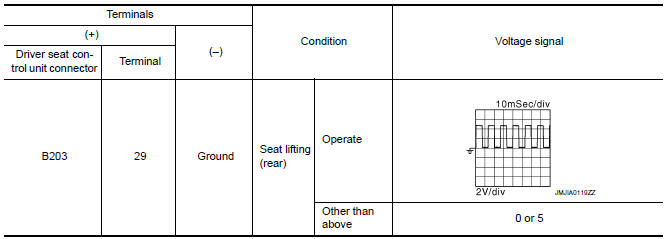
1. CHECK LIFTING SENSOR (REAR) SIGNAL
- Turn ignition switch ON.
- Read voltage signal between driver seat control unit harness connector and ground with oscilloscope.
2. CHECK LIFTING SENSOR (REAR) CIRCUIT
- Turn ignition switch OFF.
- Disconnect driver seat control unit and front power seat LH [lifting motor (rear)].
- Check the continuity between driver seat control unit harness connector and front power seat LH [lifting motor (rear)] harness connector.

- Check the continuity between driver seat control unit harness connector and ground.

3. CHECK LIFTING SENSOR (REAR) POWER SUPPLY
- Connect driver seat control unit.
- Turn ignition switch ON.
- Check the voltage between front power seat LH [lifting motor (rear)] harness connector and ground.

4. CHECK LIFTING SENSOR (REAR) POWER SUPPLY CIRCUIT
- Turn ignition switch OFF.
- Disconnect driver seat control unit.
- Check the continuity between driver seat control unit harness connector and front power seat LH [lifting motor (rear)] harness connector

- Check the continuity between driver seat control unit harness connector and ground.

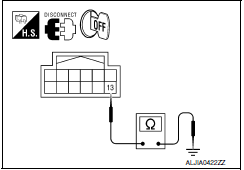
5. CHECK LIFTING SENSOR (REAR) GROUND
- Turn ignition switch OFF.
- Check the continuity between front power seat LH [lifting motor (rear)] harness connector and ground.

 Lifting sensor (front)
Description
The lifting sensor (front) is installed to the seat frame.
The pulse signal is input to the driver seat control unit when the
lifting (front) is operated.
The driver seat contro ...
 Tilt sensor
Description
The tilt sensor is installed to the steering column assembly.
The pulse signal is input to the driver seat control unit when the tilt
is operated.
The driver seat control unit c ...
Other materials:
Installing the spare tire
The spare tire is designed for emergency
use. For additional information, refer to
"Wheels and tires" in the "Do-it-yourself"
section of this manual.
1. Clean any mud or dirt from the surface between
the wheel and hub.
2. Carefully put the spare tire on and tighten
the wheel nuts finger ...
TCM branch line circuit
Diagnosis Procedure
1.CHECK CONNECTOR
Turn the ignition switch OFF.
Disconnect the battery cable from the negative terminal.
Check the following terminals and connectors for damage, bend and
loose connection (unit side and connector
side).
TCM
Harness connector F1
Harness con ...
Child safety rear door lock
Child safety locks help prevent the rear doors
from being opened accidentally, especially when
small children are in the vehicle.
The child safety lock levers are located on the
edge of the rear doors.
When the lever is in the unlock position 2 , the
door can be opened from the outside ...
Nissan Maxima Owners Manual
- Illustrated table of contents
- Safety-Seats, seat belts and supplemental restraint system
- Instruments and controls
- Pre-driving checks and adjustments
- Monitor, climate, audio, phone and voice recognition systems
- Starting and driving
- In case of emergency
- Appearance and care
- Do-it-yourself
- Maintenance and schedules
- Technical and consumer information
Nissan Maxima Service and Repair Manual

0.0111