
Nissan Maxima Owners Manual: Operating range
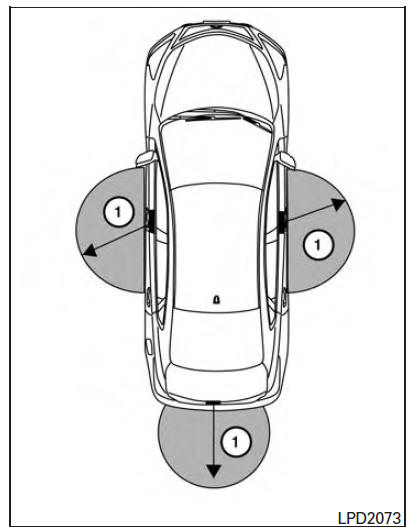
The Intelligent Key functions can only be used when the Intelligent Key is within the specified operating range from the request switch 1 .
NOTE:
If all doors are already unlocked, opening the trunk does NOT require an Intelligent Key to be in range of the trunk request switch or rear of the vehicle.
When the Intelligent Key battery is discharged or strong radio waves are present near the operating location, the Intelligent Key operating range becomes narrower, and the Intelligent Key may not function properly.
The operating range is within 31.50 in (80 cm) from each request switch 1 .
If the Intelligent Key is too close to the door glass, handle or rear bumper, the request switches may not function.
When the Intelligent Key is within the operating range, it is possible for anyone, even someone who does not carry the Intelligent Key, to push the request switch to lock/unlock the doors.
 NISSAN Intelligent Key
WARNING
Radio waves could adversely affect
electric medical equipment. Those who
use a pacemaker should contact the
electric medical equipment manufacturer
for the possible influences befo ...
 Door locks/unlocks precaution
Do not push the door handle request switch
with the Intelligent Key held in your hand as
illustrated. The close distance to the door
handle will cause the Intelligent Key system
to have ...
Other materials:
Horizontal synchronizing (HP) signal circuit
Description
In composite image (AUX image, camera image), transmit the vertical
synchronizing (VP) signal and horizontal
synchronizing (HP) signal from display unit to AV control unit so as to
synchronize the RGB images displayed
with AV control unit such as the image quality adjusting menu ...
Engine compartment check locations
VQ35DE engine
Engine coolant reservoir
Drive belt location
Engine oil filler cap
Brake fluid reservoir
Air cleaner
Fuse block
Fuse block/Fusible links
Fusible links
Battery
Engine oil dipstick
Radiator cap
Power steering fluid reservoir
Windshield-washer fluid reservo ...
Wiring diagram
BRAKE CONTROL SYSTEM
Wiring Diagram
...
Nissan Maxima Owners Manual
- Illustrated table of contents
- Safety-Seats, seat belts and supplemental restraint system
- Instruments and controls
- Pre-driving checks and adjustments
- Monitor, climate, audio, phone and voice recognition systems
- Starting and driving
- In case of emergency
- Appearance and care
- Do-it-yourself
- Maintenance and schedules
- Technical and consumer information
Nissan Maxima Service and Repair Manual

0.0079