
Nissan Maxima Owners Manual: Using the panic alarm
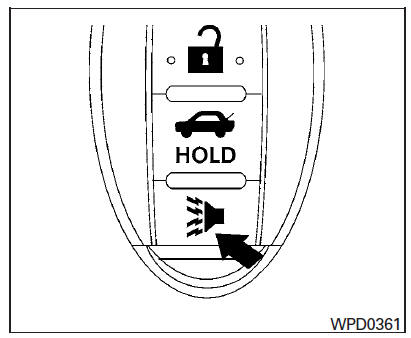
If you are near your vehicle and feel threatened,
you may activate the panic alarm to call attention
by pressing and holding the  button
on the
Intelligent Key for longer than 1 second.
button
on the
Intelligent Key for longer than 1 second.
The panic alarm and headlights will stay on for a period of time.
The panic alarm stops when:
- It has run for a period of time, or
- Any button is pressed on the Intelligent Key.
- The request switch on the driver or passenger door is pushed and the Intelligent Key is in range of the door handle.
- The trunk open request switch is pressed while the Intelligent key is in range of the trunk request switch area and the doors are locked.
 Releasing the trunk lid
Press the button for longer than
1 second
to open the trunk lid. The trunk release button will
not operate when the ignition switch is in the ON
position or when the trunk cancel switch is i ...
 Answer back horn feature
If desired, the answer back horn feature can be
deactivated using the Intelligent Key. When it is
deactivated and the LOCK
button is
pushed, the hazard indicator lights flash twice.
...
Other materials:
Tire and loading information label
Seating capacity: The maximum number
of occupants that can be seated
in the vehicle.
Vehicle load limit: Refer to the loading
information in the "Technical and
consumer information" section of this
manual.
Original tire size: The size of the tires
originally installed on the v ...
P0011, P0021 IVT control
DTC Logic
DTC DETECTION LOGIC
NOTE:
If DTC P0011 or P0021 is displayed with DTC P0075, P0081, first perform the
trouble diagnosis for DTC
P0075, P0081.
DTC CONFIRMATION PROCEDURE
1.PRECONDITIONING
If DTC Confirmation Procedure has been previously conducted, always perform
the follow ...
Subwoofer
Removal and Installation
Subwoofer (LH)
Subwoofer (RH)
Subwoofer screws
Subwoofer connectors
REMOVAL
Remove the rear parcel shelf finisher. Refer to INT-28, "Removal
and Installation".
Remove the subwoofer screws.
Pull out the subwoofer, disconnect the h ...
Nissan Maxima Owners Manual
- Illustrated table of contents
- Safety-Seats, seat belts and supplemental restraint system
- Instruments and controls
- Pre-driving checks and adjustments
- Monitor, climate, audio, phone and voice recognition systems
- Starting and driving
- In case of emergency
- Appearance and care
- Do-it-yourself
- Maintenance and schedules
- Technical and consumer information
Nissan Maxima Service and Repair Manual

0.0074