
Nissan Maxima Owners Manual: Answer back horn feature
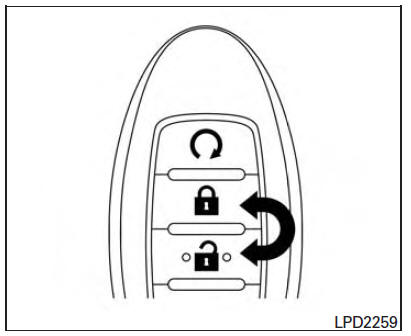
If desired, the answer back horn feature can be
deactivated using the Intelligent Key. When it is
deactivated and the LOCK button is
pushed, the hazard indicator lights flash twice.
button is
pushed, the hazard indicator lights flash twice.
When the UNLOCK  button is pushed,
neither
the hazard indicator lights nor the horn operates.
button is pushed,
neither
the hazard indicator lights nor the horn operates.
NOTE:
If you change the answer back horn and light flash feature with the Intelligent Key, the vehicle information display screen will show the current mode after the ignition switch has been cycled from the OFF to the ON position. The vehicle information display screen can also be used to change the answer back horn mode.
To deactivate: Press and hold the  and
and  buttons for at least 2 seconds.
The hazard indicator lights will flash three times to confirm that the answer back horn feature has been deactivated.
To activate: Press and hold the  and
and  buttons for at least 2 seconds
once
more.
buttons for at least 2 seconds
once
more.
The hazard indicator lights will flash once and the horn will sound once to confirm that the horn beep feature has been reactivated.
Deactivating the horn beep feature does not silence the horn if the alarm is triggered.
 Using the panic alarm
If you are near your vehicle and feel threatened,
you may activate the panic alarm to call attention
by pressing and holding the button
on the
Intelligent Key for longer than 1 second.
Th ...
 Warning signals
To help prevent the vehicle from moving unexpectedly
by erroneous operation of the Intelligent
Key or to help prevent the vehicle from being
stolen, a chime or buzzer sounds from inside and
outsid ...
Other materials:
P1611 ID discord, IMMU-ECM
Description
BCM performs the ID verification with ECM that allows the
engine to start. Start the engine if the ID is OK.
ECM prevents the engine from starting if the ID is not registered. BCM starts
the communication with ECM if
ignition switch is turned ON.
DTC Logic
DTC DETECTION LOGIC ...
Remote engine start operating range
CAUTION
When the Intelligent Key battery is discharged
or other strong radio wave
sources are present near the operating
location, the Intelligent Key operating
range becomes narrower, and the Intelligent
Key may not function properly.
The remote engine start function can only be
used when t ...
Inside mirror
Exploded View
Inside mirror
Inside mirror finisher
Mirror base
Removal and Installation
REMOVAL
Remove inside mirror finisher.
Remove screw of mirror base.
Slide the mirror upward to remove.
Disconnect the harness connector from the inside mirror.
INSTALLATION
Ins ...
Nissan Maxima Owners Manual
- Illustrated table of contents
- Safety-Seats, seat belts and supplemental restraint system
- Instruments and controls
- Pre-driving checks and adjustments
- Monitor, climate, audio, phone and voice recognition systems
- Starting and driving
- In case of emergency
- Appearance and care
- Do-it-yourself
- Maintenance and schedules
- Technical and consumer information
Nissan Maxima Service and Repair Manual

0.0225