
Nissan Maxima Service and Repair Manual: Unit disassembly and assembly
DOOR MIRROR
Exploded View
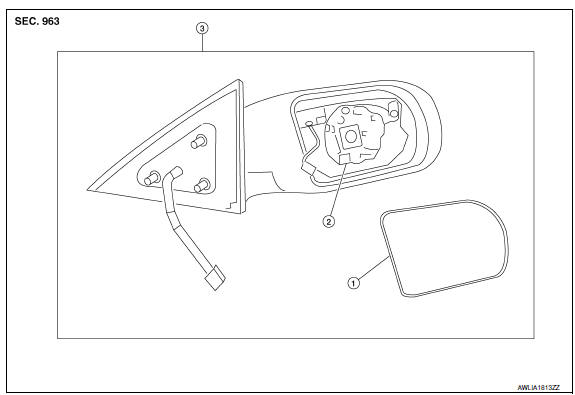
- Door mirror glass
- Actuator assembly
- Door mirror assembly
Disassembly
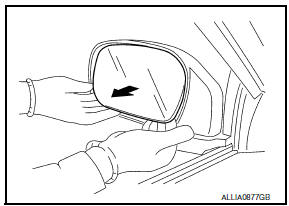
- Turn the door mirror glass surface upward.
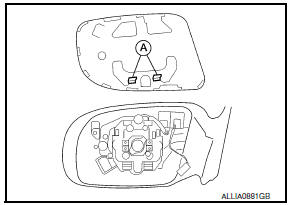
- Pull from the bottom to disengage lower clips
- Lift to disengage the upper mirror hooks (A).
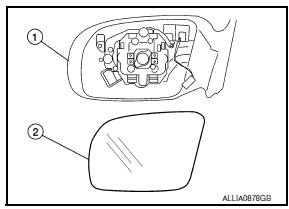
- Disconnect the harness connector from the door mirror.
- Remove the door mirror glass (2) from the door mirror housing assembly (1).
- Remove the actuator screws.
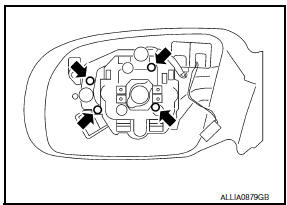
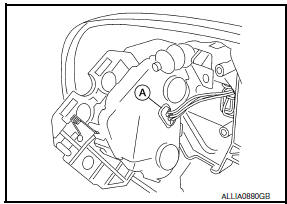
- Disconnect the harness connector (A) from the door mirror and remove actuator assembly.
- Disengage the pawls and remove the door mirror cover from the mirror assembly.
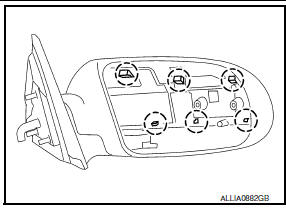
 : Pawl
Assembly
Assembly is in the reverse order of disassembly.
DOOR MIRROR COVER
DOOR MIRROR COVER : Disassembly
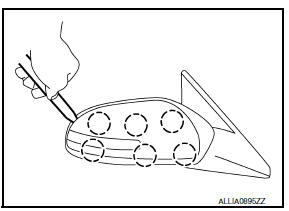
- Using a suitable tool disengage the upper mirror cover pawls.
 : Pawl
 - Using a suitable tool disengage the lower mirror cover pawls and remove mirror cover.
CAUTION: Be careful not to damage the door mirror or door mirror cover with tool
DOOR MIRROR COVER : Assembly
Assembly is in the reverse order of disassembly.
CAUTION: After installation, check that pawls are securely engaged.
 Door mirror
Exploded View
Door panel
Nuts
Door mirror cover
Door mirror assembly
Clip C101
Removal and Installation
REMOVAL
Remove the front door finisher. Refer to INT-18, "Remo ...

Other materials:
How to set srt code
Description
OUTLINE
In order to set all SRTs, the self-diagnoses as in the "SRT ITEM" table must
have been performed at least
once. Each diagnosis may require actual driving for a long period of time under
various conditions.
SRT ITEM
The table below shows required self-diagnostic items to ...
P0447 evap canister vent control valve
Description
The EVAP canister vent control valve is located on the EVAP canister
and is used to seal the canister vent.
This solenoid valve responds to signals from the ECM. When the
ECM sends an ON signal, the coil in the solenoid valve is energized.
A plunger will then move to seal ...
Low tire pressure warning
If the vehicle is being driven with low tire
pressure, the warning light will illuminate.
A "Tire Pressure Low - Add Air" warning
also appears in the vehicle information display.
When the low tire pressure warning light
illuminates, you should stop and adjust the
tire pressure of all four ...
Nissan Maxima Owners Manual
- Illustrated table of contents
- Safety-Seats, seat belts and supplemental restraint system
- Instruments and controls
- Pre-driving checks and adjustments
- Monitor, climate, audio, phone and voice recognition systems
- Starting and driving
- In case of emergency
- Appearance and care
- Do-it-yourself
- Maintenance and schedules
- Technical and consumer information
Nissan Maxima Service and Repair Manual

0.0111