
Nissan Maxima Service and Repair Manual: Front combination lamp
Disassembly and Assembly
EXPLODED VIEW
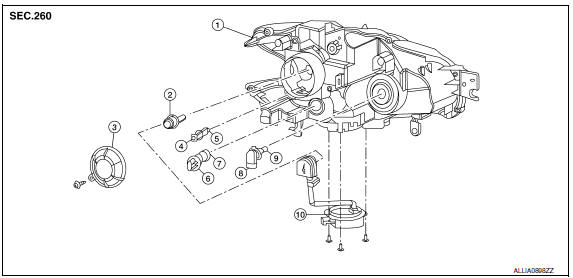
- Front combination lamp
- Xenon bulb
- Plastic cover
- Side marker lamp socket
- Side marker lamp bulb
- Front turn signal lamp socket
- Front turn signal lamp bulb
- Halogen bulb socket (high beam)
- Halogen bulb (high beam)
- HID control unit and xenon bulb socket
CAUTION: HID control unit and xenon bolb socket cannot be disassembled.
DISASSEMBLY
- Remove the screw from cover and rotate the plastic cover counterclockwise and unlock it.
- Rotate the xenon bulb socket counterclockwise and unlock it.
- Unlock the retaining spring and remove the xenon bulb.
- Remove the HID control unit installation screws.
- Remove the screw and disconnect the harness connector from the HID control unit.
- Remove the xenon bulb socket from front combination lamp.
- Rotate the halogen bulb socket counterclockwise and unlock it.
- Remove the bulb from halogen bulb socket.
- Rotate the front turn signal lamp socket counterclockwise and unlock it.
- Remove the bulb from front turn signal lamp socket.
- Rotate the front side marker lamp socket counterclockwise and unlock it.
- Remove the bulb from front side marker lamp socket.
ASSEMBLY
Assembly is in the reverse order of disassembly.
CAUTION:
- Install HID control unit securely.
- After installing the bulb, install the plastic cover and the bulb socket securely for watertightness.

 Rear combination lamp
Disassembly and Assembly
Rear combination lamp
Rear side marker lamp socket
Rear side marker lamp bulb
Rear turn signal lamp socket
Rear turn signal lamp bulb
Back-up lamp socket ...
Other materials:
P1745 line pressure control
Description
The line pressure solenoid valve regulates the oil pump
discharge pressure to suit the driving condition in
response to a signal sent from the TCM.
DTC Logic
DTC DETECTION LOGIC
DTC CONFIRMATION PROCEDURE
NOTE:
Immediately after performing any "DTC CONFIRMATION PROCEDURE", a ...
Blower unit
BLOWER UNIT
BLOWER UNIT : Removal and Installation
COMPONENTS
Heater and cooling unit
Blower unit Front
REMOVAL
Remove the heater and cooling unit assembly. Refer to HA-47,
"HEATER & COOLING UNIT ASSEMBLY : Removal and Installation".
Disconnect the harness connector from ...
Front wiper motor hi circuit
Component Function Check
1. CHECK FRONT WIPER HI OPERATION
IPDM E/R AUTO ACTIVE TEST
Start IPDM E/R auto active test. Refer to PCS-11, "Diagnosis
Description".
Check that the front wiper operates at the HI operation.
CONSULT ACTIVE TEST
Select "FRONT WIPER" of IPDM E/R active test ...
Nissan Maxima Owners Manual
- Illustrated table of contents
- Safety-Seats, seat belts and supplemental restraint system
- Instruments and controls
- Pre-driving checks and adjustments
- Monitor, climate, audio, phone and voice recognition systems
- Starting and driving
- In case of emergency
- Appearance and care
- Do-it-yourself
- Maintenance and schedules
- Technical and consumer information
Nissan Maxima Service and Repair Manual

0.0104