
Nissan Maxima Service and Repair Manual: Optical sensor
Exploded View
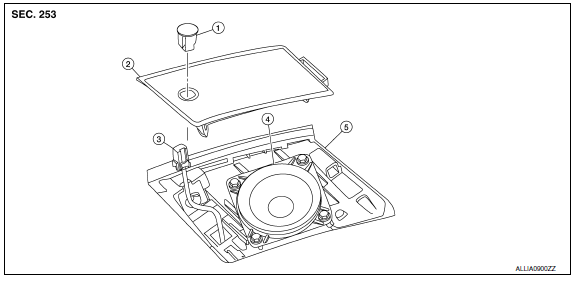
- Optical sensor
- LH front tweeter speaker grille
- Optical sensor harness connector
- LH front tweeter speaker
- Instrument panel
Removal and Installation
CAUTION: Whenever a suitable tool is used, always wrap a cloth around the end of the tool to protect components from damage.
REMOVAL
- Carefully remove the LH front tweeter speaker grille using a suitable tool.
- Insert a suitable tool between the optical sensor and the LH front tweeter speaker grille. Lift the optical sensor upward.
- Disconnect the harness connector from the optical sensor and remove.
INSTALLATION
Installation is in the reverse order of removal.
DOOR MIRROR TURN SIGNAL LAMP
Removal and Installation I
The door mirror turn signal lamp is an integral part of the door mirror and must be replaced as an assembl
 Front fog lamp
Exploded View
Front bumper fascia
Front fog lamp
Front fog lamp bracket
Clip
Spring nuts
Removal and Installation
FRONT FOG LAMP
Removal
Remove the front bumper fascia. ...
 Lighting & turn signal switch
Removal and Installation
NOTE: The lighting and turn signal switch is
integral with the combination switch assembly.
REMOVAL
Unlock steering wheel.
CAUTION:
Before servicing, disconnect ...
Other materials:
PFCW system limitations
Illustration A
Illustration B
WARNING
Listed below are the system limitations for
the PFCW system. Failure to operate the
vehicle in accordance with these system
limitations could result in serious injury or
death.
The PFCW system cannot detect all vehicles
under all conditions.
Th ...
ABS function does not operate
Diagnosis Procedure
CAUTION:
ABS does not operate when speed is 10 km/h (6 MPH) or lower.
1.CHECK ABS WARNING LAMP DISPLAY
Make sure that the ABS warning lamp turns OFF after ignition switch is turned
on or when driving
2.CHECK WHEEL SENSOR AND SENSOR ROTOR
Check the following:
Wheel se ...
DLC branch line circuit
Diagnosis Procedure
1.CHECK CONNECTOR
Turn the ignition switch OFF.
Disconnect the battery cable from the negative terminal.
Check the terminals and connectors of the data link connector for
damage, bend and loose connection
(connector side and harness side).
2.CHECK HARNESS FOR OP ...
Nissan Maxima Owners Manual
- Illustrated table of contents
- Safety-Seats, seat belts and supplemental restraint system
- Instruments and controls
- Pre-driving checks and adjustments
- Monitor, climate, audio, phone and voice recognition systems
- Starting and driving
- In case of emergency
- Appearance and care
- Do-it-yourself
- Maintenance and schedules
- Technical and consumer information
Nissan Maxima Service and Repair Manual

0.0161