
Nissan Maxima Owners Manual: Automatic anti-glare rearview mirror
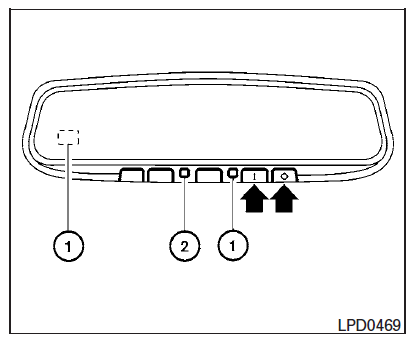
The inside mirror is designed so that it automatically dims during night time conditions and according to the intensity of the headlights of the vehicle following you. The automatic anti-glare feature is activated when the ignition switch is in the ON position.
The indicator light will illuminate when the automatic anti-glare feature is operating.
NOTE:
Do not hang any objects over the sensors 1 or apply glass cleaner to the sensors.
Doing so will reduce the sensitivity of the sensors, resulting in improper operation.
The indicator light 2 will illuminate when the automatic anti-glare feature is operating.
To turn off the automatic anti-glare feature, press the O button. The indicator light will turn off.
To turn on the automatic anti-glare feature again, press the | button again. The indicator light will turn on.
For additional information, refer to the "HomeLink Universal Transceiver" in the "Instruments and controls" section of this manual.
 Mirrors
...
 Outside mirrors
The outside mirror remote control will operate
only when the ignition switch is in the ACC or ON
position.
Move the small switch 1 to select the right or left
mirror. Adjust each mirror to t ...
Other materials:
Opening windows
The Intelligent Key allows you to simultaneously
open windows equipped with automatic operation.
To open the windows, press and hold
the button on the Intelligent
Key for
longer than 3 seconds.
The door windows will lower while holding down
the button on the Intelligent Key.
NOTE: ...
Rocker Cover
Exploded View
Camshaft position sensors (LH)
O-rings
Camshaft position sensors (RH)
O-rings
Rocker cover (RH)
Rocker cover gasket (RH)
Rocker cover gasket (LH)
Rocker cover (LH)
Refer to INSTALLATION
Front
Removal and Installation (LH)
REMOVAL
Remove the ...
System maintenance
The sensor A is located behind the lower grille
of the front bumper.
To keep the system operating properly, be sure to
observe the following:
Always keep the sensor area of the front
bumper clean.
Do not strike or damage the areas around
the sensor.
Do not cover or attach sticke ...
Nissan Maxima Owners Manual
- Illustrated table of contents
- Safety-Seats, seat belts and supplemental restraint system
- Instruments and controls
- Pre-driving checks and adjustments
- Monitor, climate, audio, phone and voice recognition systems
- Starting and driving
- In case of emergency
- Appearance and care
- Do-it-yourself
- Maintenance and schedules
- Technical and consumer information
Nissan Maxima Service and Repair Manual

0.0099