
Nissan Maxima Service and Repair Manual: Diagnosis system (BCM)
COMMON ITEM
COMMON ITEM : CONSULT Function (BCM - COMMON ITEM)
APPLICATION ITEM
CONSULT performs the following functions via CAN communication with BCM.
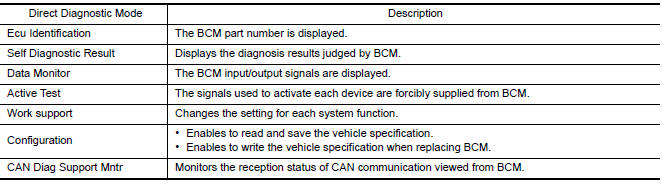
SYSTEM APPLICATION
BCM can perform the following functions.
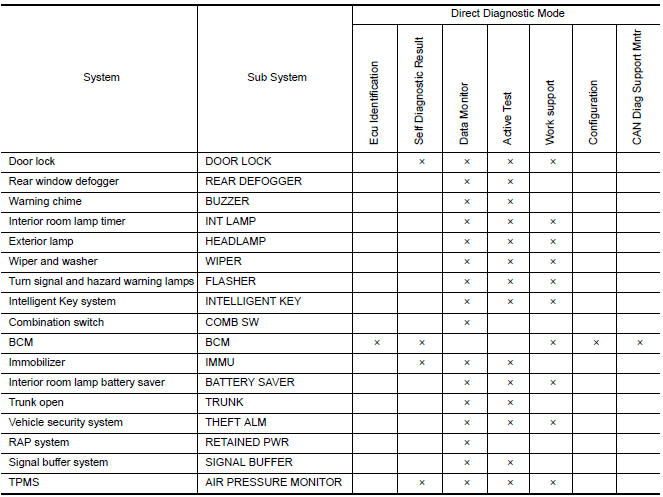
WIPER
WIPER : CONSULT Function (BCM - WIPER)
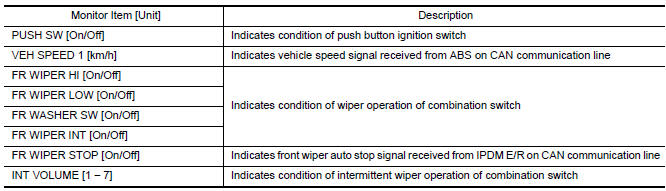
DATA MONITOR
ACTIVE TEST

WORK SUPPORT

* : Initial setting
 System description
FRONT WIPER AND WASHER SYSTEM
System Diagram
System Description
OUTLINE
The front wiper is controlled by each function of BCM and IPDM E/R.
Control by BCM
Combination switch reading functio ...
 Diagnosis system (IPDM E/R)
Diagnosis Description
AUTO ACTIVE TEST
Description
In auto active test mode, the IPDM E/R sends a drive signal to the following
systems to check their operation.
Oil pressure warning lamp
F ...
Other materials:
Key cylinder switch
Description
The main power window and door lock/unlock switch detects condition of the
door key cylinder switch and
transmits to BCM as the LOCK or UNLOCK signal.
Component Function Check
1. CHECK DOOR KEY CYLINDER SWITCH INPUT SIGNAL
Check KEY CYL UN-SW, KEY CYL UN-SW in "DATA MONITOR" mod ...
Rear view monitor system
System Diagram
System Description
When the shift selector is in the R position, the display unit shows a view
to the rear of the vehicle. Lines which
indicate the vehicle clearance and distances are also displayed.
Component Parts Location
Tweeter LH M51
Center speaker M130
...
Tilt&telescopic switch
Removal and Installation
REMOVAL
Remove the steering column side cover (LH) (1). Refer to IP-13,
"Removal and Installation".
Release the pawls and remove tilt & telescopic switch (2) from
the steering column side cover (LH) (1).
: Pawl
INSTALLATION
Installation is in the re ...
Nissan Maxima Owners Manual
- Illustrated table of contents
- Safety-Seats, seat belts and supplemental restraint system
- Instruments and controls
- Pre-driving checks and adjustments
- Monitor, climate, audio, phone and voice recognition systems
- Starting and driving
- In case of emergency
- Appearance and care
- Do-it-yourself
- Maintenance and schedules
- Technical and consumer information
Nissan Maxima Service and Repair Manual

0.0097