
Nissan Maxima Service and Repair Manual: Front wiper motor lo circuit
Component Function Check
1. CHECK FRONT WIPER LO OPERATION
IPDM E/R AUTO ACTIVE TEST
- Start IPDM E/R auto active test. Refer to PCS-11, "Diagnosis Description".
- Check that the front wiper operates at the LO operation.
CONSULT ACTIVE TEST
- Select "FRONT WIPER" of IPDM E/R active test item.
- While operating the test item, check front wiper LO operation and OFF.
LO : Front wiper LO operation<>
OFF : Stop the front wiper.
Diagnosis Procedure
1. CHECK FRONT WIPER MOTOR (LO) OUTPUT VOLTAGE
CONSULT ACTIVE TEST
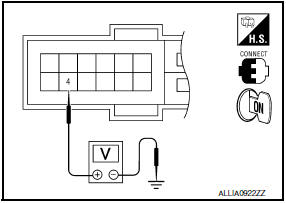
- Turn the ignition switch OFF.
- Disconnect front wiper motor.
- Turn the ignition switch ON.
- Select "FRONT WIPER" of IPDM E/R active test item.
- While operating the test item, check voltage between IPDM E/R
harness connector and ground.
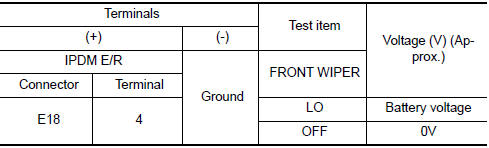
2. CHECK FRONT WIPER MOTOR (LO) OPEN CIRCUIT
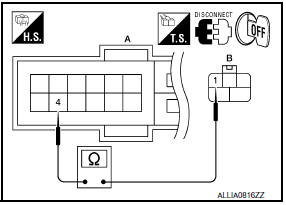
- Turn the ignition switch OFF.
- Disconnect IPDM E/R.
- Check continuity between IPDM E/R harness connector (A) and
front wiper motor harness connector (B).

 Wiper and washer fuse
Description
Fuse list
Diagnosis Procedure
1. CHECK FUSES
Check that the following fuses are not blown.
...
 Front wiper motor hi circuit
Component Function Check
1. CHECK FRONT WIPER HI OPERATION
IPDM E/R AUTO ACTIVE TEST
Start IPDM E/R auto active test. Refer to PCS-11, "Diagnosis
Description".
Check that the front wiper op ...
Other materials:
NVIS (NISSAN vehicle immobilizer system-nats)
System Diagram
System Description
INPUT/OUTPUT SIGNAL CHART
SYSTEM DESCRIPTION
The NVIS (NATS) is an anti-theft system. By registering an
Intelligent Key ID into the vehicle, it prevents the
engine being started by an unregistered Intelligent Key. It has a higher
protection again ...
Removal and installation
IPDM E/R (INTELLIGENT POWER DISTRIBUTION MODULE ENGINE
ROOM)
Removal and Installation
CAUTION:
Do not remove the relays from the IPDM E/R. Tampering with the relays may cause
additional incidents
with the vehicle.
REMOVAL
Disconnect battery negative terminal. Refer to PG-67, " ...
Front power seat adjustment
Operating tips
The power seat motor has an auto-reset
overload protection circuit. If the motor
stops during operation, wait 30 seconds
then reactivate the switch.
Do not operate the power seat switch for a
long period of time when the engine is off.
This will discharge the bat ...
Nissan Maxima Owners Manual
- Illustrated table of contents
- Safety-Seats, seat belts and supplemental restraint system
- Instruments and controls
- Pre-driving checks and adjustments
- Monitor, climate, audio, phone and voice recognition systems
- Starting and driving
- In case of emergency
- Appearance and care
- Do-it-yourself
- Maintenance and schedules
- Technical and consumer information
Nissan Maxima Service and Repair Manual

0.0092