
Nissan Maxima Service and Repair Manual: Wiring diagram
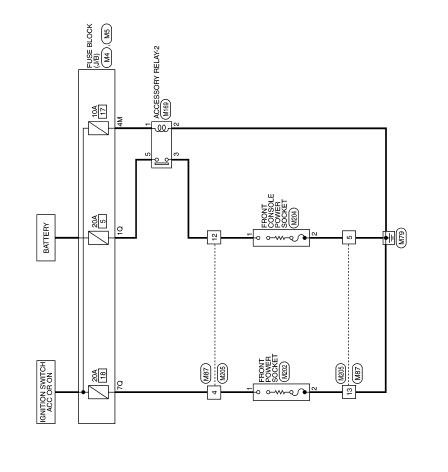
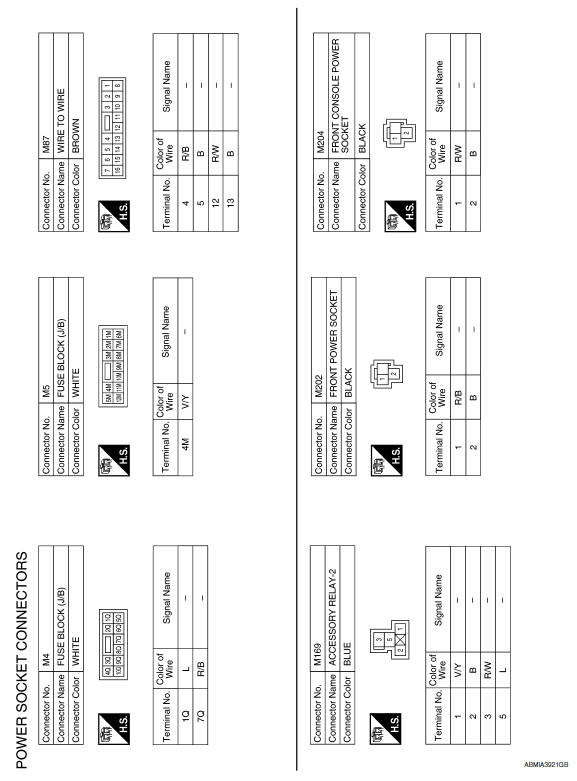
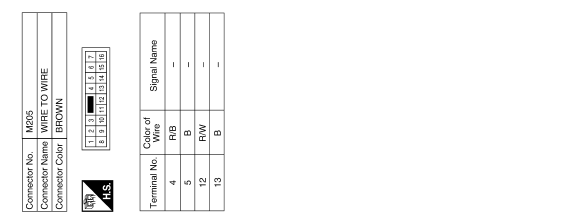
POWER SOCKET
Wiring Diagram
 Precaution
 for Supplemental Restraint System (SRS) "AIR BAG" and
"SEAT BELT PRE-TENSIONER"
The Supplemental Restraint System such as "AIR BAG" and "SEAT BELT
PRE-TENSIONER", used along with a fro ...
 Preparation
Special Service Tool
The actual shapes of the tools may differ from those illustrated here.
...
Other materials:
Satellite radio antenna
Removal and Installation
REMOVAL
Lower the headlining at the rear. Refer to INT-33, "Exploded View".
Disconnect the harness connector (A) from satellite radio
antenna.
Remove the satellite radio antenna nut (B) and the satellite radio
antenna (1).
INSTALLATION
Instal ...
Optical sensor
Description
The optical sensor converts the outside brightness (lux) to voltage and
transmits the optical sensor signal to the BCM.
Component Function Check
1.CHECK OPTICAL SENSOR SIGNAL BY CONSULT
CONSULT
Turn the ignition switch ON.
Select "OPTICAL SENSOR" of BCM (HEAD LAMP) DATA MONIT ...
Around View Monitor (if so equipped)
1. CAMERA button
WARNING
Failure to follow the warnings and instructions
for the proper use of the
Around View Monitor system could
result in serious injury or death.
The Around View Monitor is a convenience
feature and is not a substitute
for proper vehicle operation because it ...
Nissan Maxima Owners Manual
- Illustrated table of contents
- Safety-Seats, seat belts and supplemental restraint system
- Instruments and controls
- Pre-driving checks and adjustments
- Monitor, climate, audio, phone and voice recognition systems
- Starting and driving
- In case of emergency
- Appearance and care
- Do-it-yourself
- Maintenance and schedules
- Technical and consumer information
Nissan Maxima Service and Repair Manual

0.0089