
Nissan Maxima Service and Repair Manual: BCM (Body control module))
REMOVAL AND INSTALLATION
Removal and Installation
REMOVAL
CAUTION: Before replacing BCM, perform "READ CONFIGURATION" to save or print current vehicle specification.
Refer to BCS-5, "ADDITIONAL SERVICE WHEN REPLACING CONTROL UNIT (BCM) : Work Procedure ".
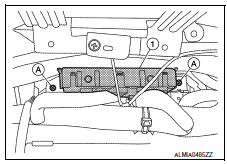
- Remove the combination meter. Refer to MWI-122, "Removal and Installation ".
- Remove the BCM screws (A) using a suitable tool and pull out the BCM (1).
- Disconnect the harness connector from the BCM (1) and remove.
INSTALLATION
Installation is in the reverse order of removal.
CAUTION:
- When replacing BCM, perform "WRITE CONFIGURATION ". Refer to BCS-5, "ADDITIONAL SERVICE WHEN REPLACING CONTROL UNIT (BCM) : Work Procedure ".
- When replacing BCM, perform the system initialization (NATS). Refer to the CONSULT immobilizer mode and follow the on-screen instructions.
- When replacing BCM, if new BCM does not come with keyfobs attached, all existing keyfobs must be re-registered. Refer to the CONSULT immobilizer mode and follow the on-screen instructions.
 Preparation
Commercial Service Tools
...
 Lan system
...
Other materials:
P1801 vias control solenoid valve 2
Description
The VIAS control solenoid valve 2 cuts the intake manifold vacuum signal for
power valve 2 control. It
responds to ON/OFF signals from the ECM. When the solenoid is OFF, the vacuum
signal from the intake
manifold is cut. When the ECM sends an ON signal the coil pulls the plunger ...
Removal and installation
POWER SOCKET
Removal and Installation
POWER SOCKET
NOTE: If the tool does not fit because of
the location of the power socket, further disassembly may be required. Refer
to IP-14, "Removal and Installation".
Removal
Remove the fuse for the power socket.
Insert one end of the Tool (A) i ...
ABS branch line circuit
Diagnosis Procedure
1.CHECK CONNECTOR
Turn the ignition switch OFF.
Disconnect the battery cable from the negative terminal.
Check the terminals and connectors of the ABS actuator and
electric unit (control unit) for damage, bend
and loose connection (unit side and connector side).
...
Nissan Maxima Owners Manual
- Illustrated table of contents
- Safety-Seats, seat belts and supplemental restraint system
- Instruments and controls
- Pre-driving checks and adjustments
- Monitor, climate, audio, phone and voice recognition systems
- Starting and driving
- In case of emergency
- Appearance and care
- Do-it-yourself
- Maintenance and schedules
- Technical and consumer information
Nissan Maxima Service and Repair Manual

0.0095