
Nissan Maxima Service and Repair Manual: Audio system
SYSTEM DESCRIPTION
AUDIO SYSTEM
System Diagram
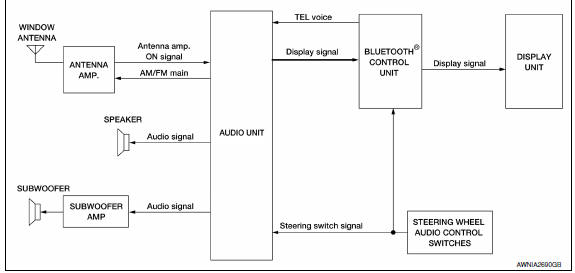
System Description
AUDIO SYSTEM
The audio system consists of the following components
- Audio unit
- Display unit
- Bluetooth control unit
- Window antenna
- Steering wheel audio control switches
- Front door speakers
- Tweeters
- Rear door speakers
- Subwoofer amp.
- Subwoofers
When the audio system is on, radio signals are received by the window antenna. The audio unit then sends audio signals to the front door speakers, tweeters, rear door speakers, subwoofer amp. and subwoofers.
Refer to Owner's Manual for audio system operating instructions.
Component Parts Location
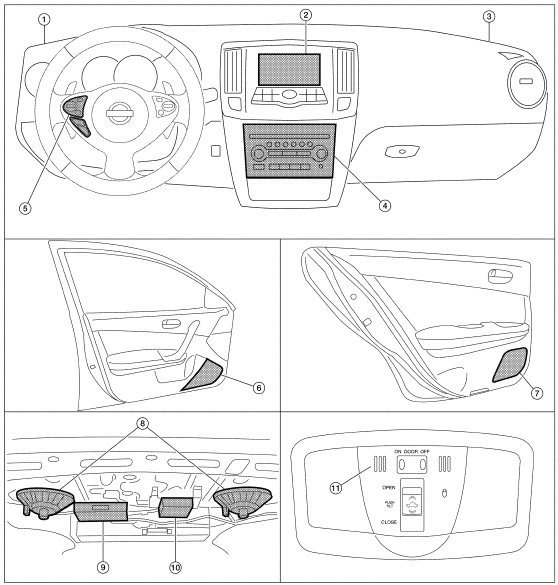
- Tweeter LH M143
- Display unit M109
- Tweeter RH M144
- Audio unit M133, M147
- Steering wheel audio control switches 6. Front door speaker LH D3 RH D103
- Rear door speaker LH D209 RH D309
- Subwoofers (view of underside of parcel shelf) LH B16 RH B17
- Bluetooth control unit B125, B126, B130
- Subwoofer amp. B21 11. Microphone R7
Component Description
| Part name | Description |
| Audio unit | Controls audio and AUX IN system functions |
| Steering wheel audio control switches |
|
| Front door speakers |
|
| Tweeters |
|
| Rear door speakers |
|
| Bluetooth control unit |
|
| Display unit |
|
| Subwoofer amp |
|
| Subwoofers |
|
 Diagnosis and repair workflow
BASIC INSPECTION
DIAGNOSIS AND REPAIR WORKFLOW
Work Flow
OVERALL SEQUENCE
DETAILED FLOW
1.GET INFORMATION FOR SYMPTOM
Get detailed information from the customer about the symptom (the condit ...
 Hands-free phone system
System Diagram
System Description
Refer to the owner's manual for Bluetooth telephone system operating
instructions. NOTE: Cellular
telephones must have their wireless connection set up (paire ...
Other materials:
Step lamp circuit
Description
Controls the step lamp (ground side) to turn the step lamp ON and OFF.
Component Function Check
CAUTION: Before performing the diagnosis,
check that the following is normal.
Battery saver output/power supply
Step lamp bulbs
1.CHECK STEP LAMP OPERATION
CONSULT
Turn igni ...
DLC branch line circuit
Diagnosis Procedure
1.CHECK CONNECTOR
Turn the ignition switch OFF.
Disconnect the battery cable from the negative
terminal.
Check the terminals and connectors of the data
link connector for damage, bend and loose connection
(connector side and harn ...
Subwoofer
Description
The audio unit sends audio signals to the BOSE speaker amp. The BOSE speaker
amp. amplifies the audio signals before sending them to the subwoofers using
the audio signal circuits.
Diagnosis Procedure
1.CONNECTOR CHECK
Check the audio unit, BOSE speaker amp. and subwoofer connect ...
Nissan Maxima Owners Manual
- Illustrated table of contents
- Safety-Seats, seat belts and supplemental restraint system
- Instruments and controls
- Pre-driving checks and adjustments
- Monitor, climate, audio, phone and voice recognition systems
- Starting and driving
- In case of emergency
- Appearance and care
- Do-it-yourself
- Maintenance and schedules
- Technical and consumer information
Nissan Maxima Service and Repair Manual

0.0095