
Nissan Maxima Service and Repair Manual: Display unit
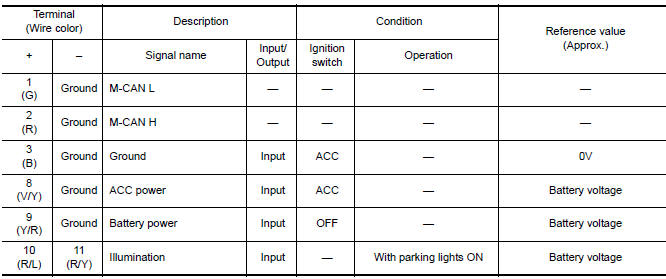
Reference Values
TERMINAL LAYOUT

PHYSICAL VALUES
 Audio unit
Reference Value
TERMINAL LAYOUT
PHYSICAL VALUES
...
 Subwoofer AMP
Reference Value
TERMINAL LAYOUT
PHYSICAL VALUES
...
Other materials:
Recommended fluids and lubricants
FOR USA AND CANADA
FOR USA AND CANADA : Fluids and Lubricants
*1: For further details, see "Engine Oil Recommendation".
*2: NISSAN recommends Genuine NISSAN Ester Oil available at a NISSAN dealer.
*3: Use only Genuine NISSAN CVT Fluid NS-2. Using transmission fluid other than
Genuine NIS ...
Door switch
Description
Detects door open/close condition.
Component Function Check
1.CHECK FUNCTION
With CONSULT
Check door switches DOOR SW-DR, DOOR SW-AS in Data Monitor mode with CONSULT.
Diagnosis Procedure
1.CHECK DOOR SWITCH INPUT SIGNAL
Turn ignition switch OFF.
Check signal between BCM c ...
Headlamp
System Diagram
System Description
Control of the headlamp system operation is dependent upon the position of
the combination switch (lighting and turn signal switch). When the lighting
switch is placed in the 2nd position, the BCM (body control module) receives
input requesting the headlam ...
Nissan Maxima Owners Manual
- Illustrated table of contents
- Safety-Seats, seat belts and supplemental restraint system
- Instruments and controls
- Pre-driving checks and adjustments
- Monitor, climate, audio, phone and voice recognition systems
- Starting and driving
- In case of emergency
- Appearance and care
- Do-it-yourself
- Maintenance and schedules
- Technical and consumer information
Nissan Maxima Service and Repair Manual

0.0146