
Nissan Maxima Service and Repair Manual: Subwoofer AMP
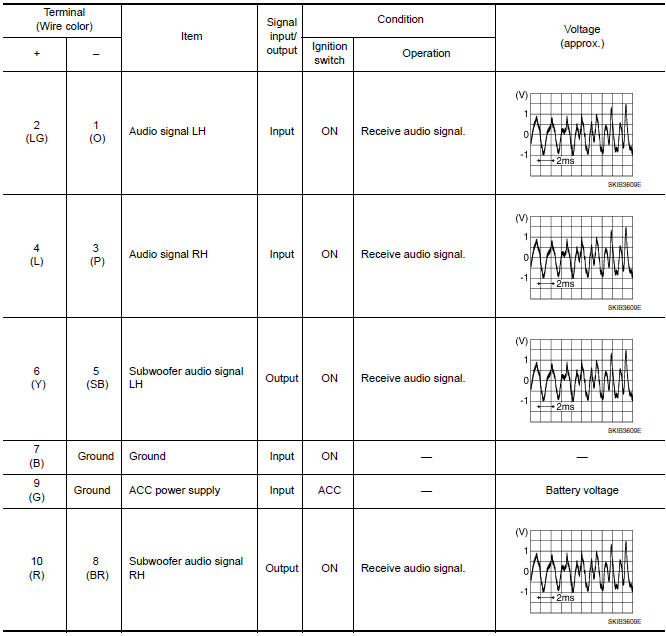
Reference Value
TERMINAL LAYOUT

PHYSICAL VALUES
 Display unit
Reference Values
TERMINAL LAYOUT
PHYSICAL VALUES
...
 Bluetooth control unit
Reference Value
TERMINAL LAYOUT
PHYSICAL VALUES
...
Other materials:
Occupant classification system
System Diagram
Occupant Classification System (OCS)
The occupant classification system (OCS) identifies if a child or child
seat is present in the front passenger seat. The OCS receives inputsfrom the
occupant classification sensor mat (1) which is locatedinside the passenger
seat cushi ...
P0031, P0032, P0051, P0052 A/F sensor 1 heater
Description
SYSTEM DESCRIPTION
The ECM performs ON/OFF duty control of the A/F sensor 1 heater corresponding
to the engine operating
condition to keep the temperature of A/F sensor 1 element within the specified
range.
DTC Logic
DTC DETECTION LOGIC
DTC CONFIRMATION PROCEDURE
1.PR ...
Vehicle loading information
WARNING
It is extremely dangerous to ride
in a cargo area inside a vehicle. In
a collision, people riding in these
areas are more likely to be seriously
injured or killed.
Do not allow people to ride in any
area of your vehicle that is not
equipped with seats and seat
belts.
Be ...
Nissan Maxima Owners Manual
- Illustrated table of contents
- Safety-Seats, seat belts and supplemental restraint system
- Instruments and controls
- Pre-driving checks and adjustments
- Monitor, climate, audio, phone and voice recognition systems
- Starting and driving
- In case of emergency
- Appearance and care
- Do-it-yourself
- Maintenance and schedules
- Technical and consumer information
Nissan Maxima Service and Repair Manual

0.0074