
Nissan Maxima Service and Repair Manual: Audio system
System Diagram
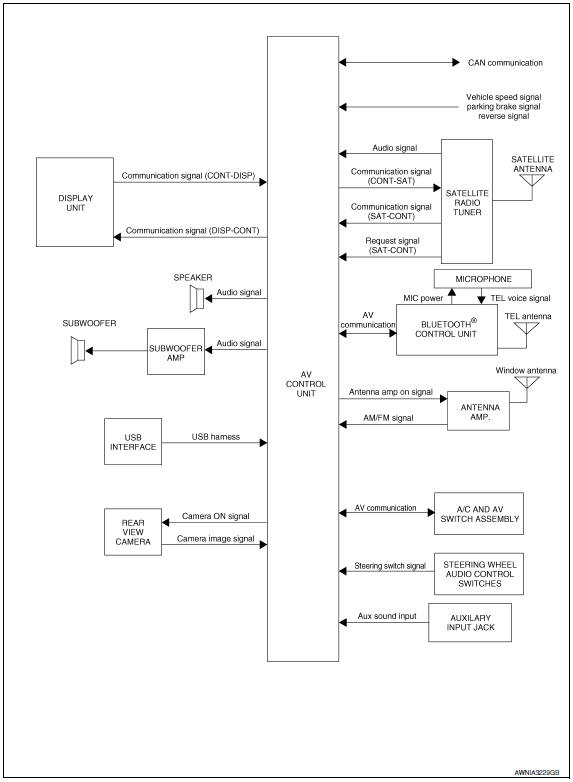
System Description
AUDIO SYSTEM
The audio system consists of the following components
- AV control unit
- Display unit
- Window antenna
- Steering wheel audio control switches
- A/C and AV switch assembly
- Front door speakers
- Tweeters
- Rear door speakers
- Subwoofers
When the audio system is on, radio signals are received by the window antenna. The AV control unit then sends audio signals to the front door speakers, tweeters, rear door speakers, subwoofer amp. and subwoofers.
Refer to Owner's Manual for audio system operating instructions.
SATELLITE RADIO SYSTEM
The satellite radio system consists of the following components
- Satellite antenna
- Satellite radio tuner
When the satellite radio system is on, radio signals are supplied to the satellite radio tuner from the satellite antenna. The satellite radio tuner then sends audio signals to the AV control unit.
Refer to Owner's Manual for satellite radio system operating instructions.
SPEED SENSITIVE VOLUME SYSTEM
Volume level of this system goes up and down automatically in proportion to the vehicle speed. The control level can be selected by the customer. Refer to Owner's Manual for operating instructions.
Component Parts Location
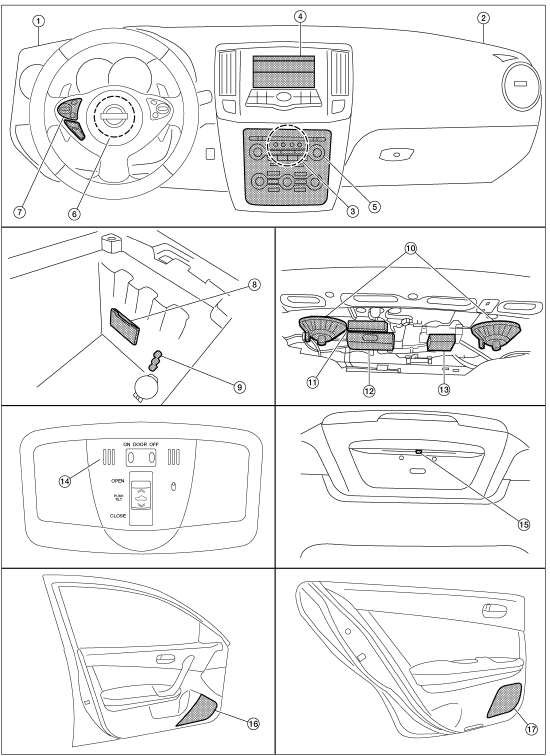
- Tweeter LH M143
- Tweeter RH M144
- AV control unit M115, M116, M117, M118, M119, M120, M121 (located behind A/C and AV switch assembly)
- Display unit M141
- A/C and AV switch assembly M98
- Steering angle sensor M53 [located in steering column behind combination switch (spiral cable)]
- Steering wheel audio control switches
- USB interface M211 (view in center console)
- Aux jack M209
- Subwoofer (view under rear parcel shelf) LH B16 RH B17
- Satellite radio tuner B111
- Bluetooth control unit B125, B130, B131
- Subwoofer amp. B21
- Microphone R7
- Rear view camera T101
- Front door speaker LH D3 RH D103
- Rear door speaker LH D202 RH D302
Component Description
| Part name | Description |
| AV control unit | Controls audio system, USB connection, AUX IN connection and satellite radio system |
| Display unit | Displays all audio and climate control related inform |
| Steering wheel audio control switches |
|
| Front door speakers |
|
| Tweeters |
|
| Rear door speakers |
|
| Subwoofer amp |
|
| Subwoofers |
|
| Satellite radio tuner |
|
| Satellite antenna | Audio signal (satellite radio) is received and output to AV control
unit.
Revision: August |

 Rear view monitor system
System Diagram
System Description
When the shift selector is in the R position, the display shows a view to the
rear of the vehicle. Lines which indicate the vehicle clearance and distances
ar ...
Other materials:
Air conditioning cut control
System Diagram
System Description
INPUT/OUTPUT SIGNAL CHART
*1: This signal is sent to the ECM via the CAN communication line.
*2: ECM determines the start signal status by the signals of engine speed and
battery voltage.
SYSTEM DESCRIPTION
This system improves engine operation when ...
Outside the vehicle
The maintenance items listed here should be
performed from time to time, unless otherwise
specified.
Doors and engine hood: Check that the doors
and engine hood operate properly. Also ensure
that all latches lock securely. Lubricate hinges,
latches, latch pins, rollers and links if necessary ...
Corrosion protection
Description
To provide improved corrosion prevention, the following anti-corrosive
measures have been implemented in
NISSAN production plants. When repairing or replacing body panels, it is
necessary to use the same anti-corrosive
measures.
Anti-Corrosive Precoated Steel (Galvannealed Stee ...
Nissan Maxima Owners Manual
- Illustrated table of contents
- Safety-Seats, seat belts and supplemental restraint system
- Instruments and controls
- Pre-driving checks and adjustments
- Monitor, climate, audio, phone and voice recognition systems
- Starting and driving
- In case of emergency
- Appearance and care
- Do-it-yourself
- Maintenance and schedules
- Technical and consumer information
Nissan Maxima Service and Repair Manual

0.0169