
Nissan Maxima Service and Repair Manual: Subwoofer AMP
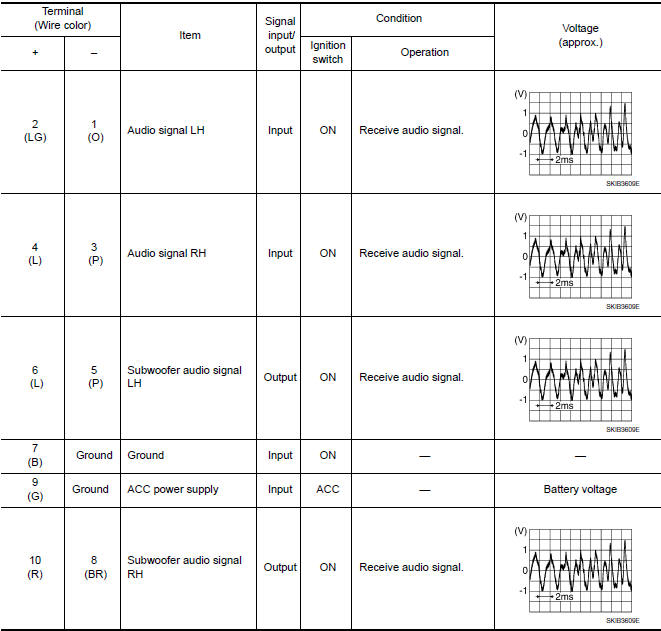
Reference Value
TERMINAL LAYOUT

PHYSICAL VALUES
 Display unit
Reference Value
TERMINAL LAYOUT
PHYSICAL VALUES
...
 Satellite radio tuner
Reference Value
PHYSICAL VALUES
...
Other materials:
Diagnosis and repair work flow
Work Flow
INTRODUCTION
The TCM receives signals from the vehicle speed sensor and transmission range
switch. Then it provides shift
control or lock-up control via CVT solenoid valves.
The TCM also communicates with the ECM by means of signals
sent from sensing elements used with the OBD-r ...
Basic inspection
DIAGNOSIS AND REPAIR WORK FLOW
Work Flow
OVERALL SEQUENCE
DETAILED FLOW
1.GET INFORMATION FOR SYMPTOM
Get detailed information from the customer about the symptom (the condition
and the environment when the
incident/malfunction occurred).
2.CONFIRM THE SYMPTOM
Try to confirm the sympt ...
Subwoofer
Description
The AV control unit sends audio signals to the subwoofer amp. The subwoofer
amp. amplifies the audio signals before sending them to the subwoofers using
the audio signal circuits.
Diagnosis Procedure
1.CONNECTOR CHECK
Check the AV control unit, subwoofer amp. and subwoofer connec ...
Nissan Maxima Owners Manual
- Illustrated table of contents
- Safety-Seats, seat belts and supplemental restraint system
- Instruments and controls
- Pre-driving checks and adjustments
- Monitor, climate, audio, phone and voice recognition systems
- Starting and driving
- In case of emergency
- Appearance and care
- Do-it-yourself
- Maintenance and schedules
- Technical and consumer information
Nissan Maxima Service and Repair Manual

0.0102