
Nissan Maxima Service and Repair Manual: Bluetooth control unit
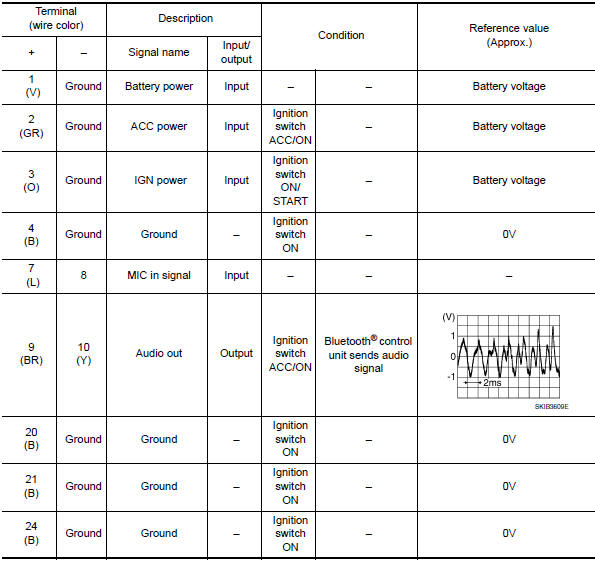
Reference Value
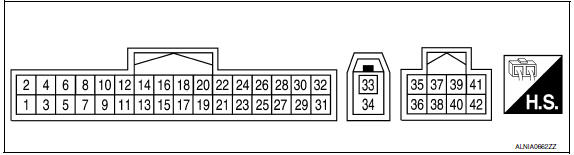
TERMINAL LAYOUT
PHYSICAL VALUES
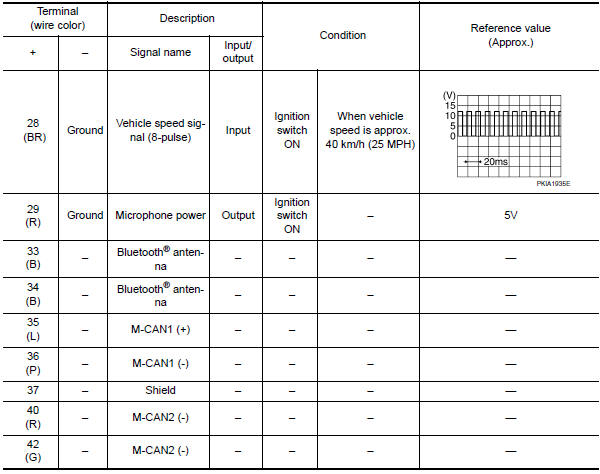
 Satellite radio tuner
Reference Value
PHYSICAL VALUES
...
 Wiring diagram
COLOR DISPLAY
Wiring Diagram - Without BOSE Audio System Without Navigation System
...
Other materials:
Fuel pump
Description
*: ECM determines the start signal status by the signals of engine speed and
battery voltage.
The ECM activates the fuel pump for several seconds after the ignition switch is
turned ON to improve engine
start ability. If the ECM receives a engine speed signal from the camsh ...
Additional service when replacing transaxle assembly
Description
When replacing the transaxle assembly, perform the following work.
ERASING, LOADING AND STORING OF CALIBRATION DATA
The TCM acquires calibration data (individual characteristic
value) of each solenoid that is stored in the
ROM assembly (in the control valve). This enabl ...
B2623 inside key antenna 3
Description
Detects whether Intelligent Key is inside the vehicle.
Installed in the trunk room.
DTC Logic
NOTE:
The Signal Tech II Tool (J-50190) can be used to perform the following
functions. Refer to the Signal Tech II
User Guide for additional information.
Check Intelligent Ke ...
Nissan Maxima Owners Manual
- Illustrated table of contents
- Safety-Seats, seat belts and supplemental restraint system
- Instruments and controls
- Pre-driving checks and adjustments
- Monitor, climate, audio, phone and voice recognition systems
- Starting and driving
- In case of emergency
- Appearance and care
- Do-it-yourself
- Maintenance and schedules
- Technical and consumer information
Nissan Maxima Service and Repair Manual

0.0081