
Nissan Maxima Service and Repair Manual: Front door speaker
Removal and Installation
REMOVAL
- Remove the front door finisher. Refer to INT-18, "Removal and Installation".
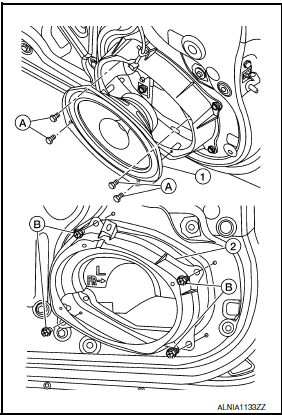
- Remove the front door speaker screws (A).
- Disconnect the harness connector from the front door speaker (1) and remove.
- Remove the front door speaker spacer screws (B) and remove the front door speaker spacer (2).
INSTALLATION
Installation is in the reverse order of removal
 Center speaker
Removal and Installation
REMOVAL
Remove the center speaker grille, using a suitable tool.
Remove the center speaker screws (A).
Pull out the center speaker (1), disconnect the harness connect ...
 Rear door speaker
Removal and Installation
REMOVAL
Remove the rear door finisher. Refer to INT-21, "Removal and
Installation".
Remove the rear door speaker screws (A).
Disconnect the harness c ...
Other materials:
P1211 TCS control unit
Description
The malfunction information related to TCS is transferred via the CAN
communication line from "ABS actuator
and electric unit (control unit)" to ECM.
Be sure to erase the malfunction information such as DTC not only for "ABS
actuator and electric unit
(control unit)" but also ...
Turn signal and hazard warning lamp system
Wiring Diagram
...
Symptom diagnosis
REFRIGERATION SYSTEM SYMPTOMS
WITH COLOR DISPLAY
WITH COLOR DISPLAY : Trouble Diagnoses for Abnormal Pressure
Whenever system′s high and/or low side pressure is abnormal, diagnose using a
manifold gauge. The marker above the gauge scale in the following tables
indicates the standard (us ...
Nissan Maxima Owners Manual
- Illustrated table of contents
- Safety-Seats, seat belts and supplemental restraint system
- Instruments and controls
- Pre-driving checks and adjustments
- Monitor, climate, audio, phone and voice recognition systems
- Starting and driving
- In case of emergency
- Appearance and care
- Do-it-yourself
- Maintenance and schedules
- Technical and consumer information
Nissan Maxima Service and Repair Manual

0.0102