
Nissan Maxima Service and Repair Manual: Trunk opener request switch
Description
Performs trunk lid open request when it is pressed.
Component Function Check
1. CHECK FUNCTION
With CONSULT
Check trunk opener request switch REQ SW -BD/TR in Data Monitor mode.

Diagnosis Procedure
1. CHECK TRUNK OPENER REQUEST SWITCH OUTPUT SIGNAL
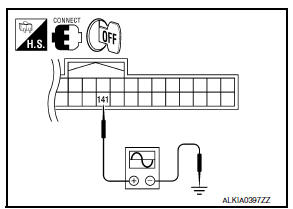
- Turn ignition switch OFF.
- Check voltage between BCM connector and ground.
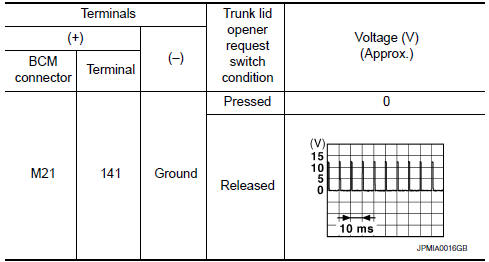
2. CHECK TRUNK OPENER REQUEST SWITCH CIRCUIT
- Disconnect BCM and trunk opener request switch connector.
- Check continuity between BCM connector and trunk opener request switch connector
- Check continuity between BCM connector and ground.


3. CHECK TRUNK OPENER REQUEST SWITCH GROUND CIRCUIT
Check continuity between trunk opener request switch connector and ground.

4. CHECK BCM OUTPUT SIGNAL
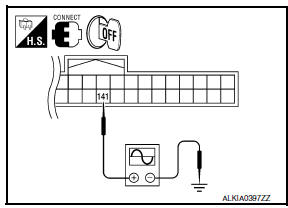
- Connect BCM connector.
- Check voltage between BCM connector and ground.
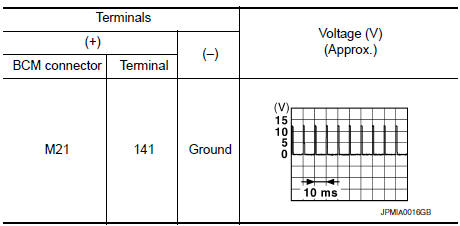
5. CHECK TRUNK OPENER REQUEST SWITCH
6. CHECK INTERMITTENT INCIDENT
Component Inspection
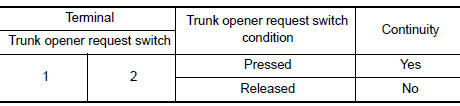
1. CHECK TRUNK OPENER REQUEST SWITCH
Check trunk opener request switch
 Door request switch
Description
Transmits door lock/unlock operation to BCM.
Component Function Check
1. CHECK FUNCTION
With CONSULT
Check door request switch REQ SW-DR, REQ SW-AS in Data Monitor mode.
Diagno ...
 Door lock actuator
DRIVER SIDE
DRIVER SIDE : Description
Locks/unlocks the door with the signal from BCM.
DRIVER SIDE : Component Function Check
1. CHECK FUNCTION
Use CONSULT to perform Active Test ("DOOR LOCK" ...
Other materials:
Trunk room lamp circuit
Description
Controls the trunk room lamp (ground side) to turn the trunk room lamp ON and
OFF.
Component Function Check
CAUTION: Before performing the diagnosis,
check that the following is normal.
Battery saver output/power supply
Trunk room lamp bulb
1.CHECK TRUNK ROOM LAMP OPERATI ...
Wiring diagram
MONOCHROME DISPLAY
Wiring Diagram - Without BOSE Audio system
...
Service data and specifications (SDS)
SERVICE DATA AND SPECIFICATIONS (SDS)
Wheel Alignment (Unladen*)
*: Fuel, engine coolant, and lubricants are full. Spare tire, jack, hand
tools, and mats are in designated positions.
Ball Joint
Wheelarch Height (Unladen*1)
*1: Fuel, engine coolant, and lubricants are full. Spare tire, ...
Nissan Maxima Owners Manual
- Illustrated table of contents
- Safety-Seats, seat belts and supplemental restraint system
- Instruments and controls
- Pre-driving checks and adjustments
- Monitor, climate, audio, phone and voice recognition systems
- Starting and driving
- In case of emergency
- Appearance and care
- Do-it-yourself
- Maintenance and schedules
- Technical and consumer information
Nissan Maxima Service and Repair Manual

0.0085