
Nissan Maxima Service and Repair Manual: Satellite radio tuner
Removal and Installation
REMOVAL
- Disconnect the battery negative terminal. Refer to PG-67, "Removal and Installation (Battery)".
- Remove the trunk upper finisher. Refer to INT-36, "Exploded View".
- Remove the parcel shelf finisher. Refer to INT-28, "Removal and Installation".
- From inside the passenger compartment, remove the bracket screws and lower the assembly for access.
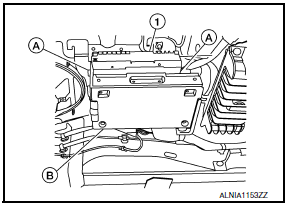
- Remove the satellite radio tuner unit screws (A), disconnect the harness connectors (B) from the satellite radio tuner (1) and remove.
INSTALLATION
Installation is in the reverse order of removal.
 Bose speaker AMP\
Removal and Installation
Bose speaker amp.
Screws
REMOVAL
NOTE:
If removing the BOSE speaker amp. bracket, it is necessary to remove the parcel
shelf finisher. The BOSE
speaker am ...
 Satellite radio antenna
Removal and Installation
REMOVAL
Lower the headlining at the rear. Refer to INT-33, "Exploded View".
Disconnect the harness connector (A) from satellite radio
antenna.
Remove the ...
Other materials:
Front door speaker
Removal and Installation
REMOVAL
Remove the front door finisher. Refer to INT-18, "Removal and
Installation".
Remove the front door speaker screws (A).
Disconnect the harness connector from the front door speaker
(1) and remove.
Remove the front door speaker spacer screws (B) and ...
P2100, P2103 throttle control motor relay
Description
Power supply for the throttle control motor is provided to the ECM via the
throttle control motor relay. The throttle
control motor relay is controlled ON/OFF by the ECM. When the ignition switch is
turned ON, the ECM
sends an ON signal to throttle control motor relay and batter ...
Headlamp (HI) circuit
Description
The IPDM E/R (intelligent power distribution module engine room) controls the
headlamp high relay based on inputs from the BCM over the CAN communication
lines. When the headlamp high relay is energized, power flows through fuses
48 and 49, located in the IPDM E/R. Power then flow ...
Nissan Maxima Owners Manual
- Illustrated table of contents
- Safety-Seats, seat belts and supplemental restraint system
- Instruments and controls
- Pre-driving checks and adjustments
- Monitor, climate, audio, phone and voice recognition systems
- Starting and driving
- In case of emergency
- Appearance and care
- Do-it-yourself
- Maintenance and schedules
- Technical and consumer information
Nissan Maxima Service and Repair Manual

0.0106