
Nissan Maxima Owners Manual: Active noise cancellation/Active sound control (if so equipped).
Active noise cancellation
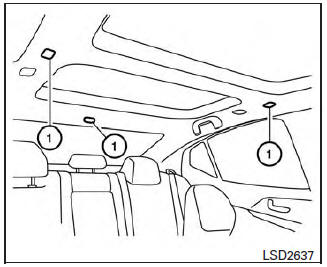
Front and rear microphones
This system uses three microphones 1 located inside the vehicle to detect engine booming noises. The system then automatically generates a noise canceling sound through the speakers and woofer to reduce engine booming noise.
NOTE:
To operate the active noise cancellation system properly:
- Do not cover the speakers or woofer.
- Do not cover the microphones.
- Do not change or modify speakers including the woofer and any audio related components such as the amplifier.
- Do not make any modification including sound deadening or modifications around the microphones, speakers, or woofer.
Active sound control
Active sound control enhances existing engine sounds according to the engine speed and driving modes through the speakers and woofer.
 Engine block heater (if so equipped)
Engine block heaters are used to assist with cold
temperature starting.
The engine block heater should be used when
the outside temperature is 20F (-7C) or lower.
WARNING
Do not use your eng ...

Other materials:
Fuel pressure
Inspection
FUEL PRESSURE RELEASE
With CONSULT
Turn ignition switch ON.
Perform "FUEL PRESSURE RELEASE" in "WORK SUPPORT" mode with
CONSULT.
Start engine.
After engine stalls, crank it two or three times to release all
fuel pressure.
Turn ignition switch OFF.
Without CONSULT
...
CVT system
System Diagram
Component Parts Location
CVT shift selector assembly (Manual
mode select switch and manual
mode position select switch)
Secondary speed sensor
CVT unit harness connector
TCM
Accelerator pedal position (APP)
sensor
Stop ...
Around View Monitor system operation
With the ignition switch in the ON position, move
the shift lever to the R (Reverse) position or press
the CAMERA button to operate the Around
View Monitor.
When the camera is first activated with the bird'seye
view in the display, a red icon (if so equipped)
will flash on the screen. This i ...
Nissan Maxima Owners Manual
- Illustrated table of contents
- Safety-Seats, seat belts and supplemental restraint system
- Instruments and controls
- Pre-driving checks and adjustments
- Monitor, climate, audio, phone and voice recognition systems
- Starting and driving
- In case of emergency
- Appearance and care
- Do-it-yourself
- Maintenance and schedules
- Technical and consumer information
Nissan Maxima Service and Repair Manual

0.0171