
Nissan Maxima Service and Repair Manual: Rear door speaker
Removal and Installation
REMOVAL
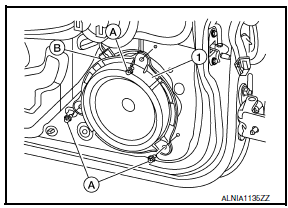
- Remove the rear door finisher. Refer to INT-21, "Removal and Installation".
- Remove the rear door speaker screws (A).
- Disconnect the harness connector (B) from the rear door speaker (1) and remove.
INSTALLATION
Installation is in the reverse order of removal.
 Front door speaker
Removal and Installation
REMOVAL
Remove the front door finisher. Refer to INT-18, "Removal and
Installation".
Remove the front door speaker screws (A).
Disconnect the harness ...
 Subwoofer
Removal and Installation
Subwoofer (LH)
Subwoofer (RH)
Subwoofer screws
Subwoofer connectors
REMOVAL
Remove the rear parcel shelf finisher. Refer to INT-28, "Removal ...
Other materials:
B263D, B263E, B263f intake door motor
Description
COMPONENT DESCRIPTION
Intake Door Motor
The intake door motor (1) is attached to the blower unit.
It rotates so that air is drawn from inlets set by the A/C auto
amp.
Motor rotation is conveyed to a lever which activates the intake
door.
DTC Logic
DTC DETECTION L ...
C1111 pump motor
Description
PUMP
The pump returns the brake fluid stored in the reservoir to the master
cylinder by reducing the pressure.
MOTOR
The motor drives the pump according to the signals transmitted by the ABS
actuator and electric unit (control
unit).
DTC Logic
DTC DETECTION LOGIC
DTC CON ...
Engine block heater (if so equipped)
Engine block heaters are used to assist with cold
temperature starting.
The engine block heater should be used when
the outside temperature is 20F (-7C) or lower.
WARNING
Do not use your engine block heater
with an ungrounded electrical system or
a 2-pronged adapter. You can be serious ...
Nissan Maxima Owners Manual
- Illustrated table of contents
- Safety-Seats, seat belts and supplemental restraint system
- Instruments and controls
- Pre-driving checks and adjustments
- Monitor, climate, audio, phone and voice recognition systems
- Starting and driving
- In case of emergency
- Appearance and care
- Do-it-yourself
- Maintenance and schedules
- Technical and consumer information
Nissan Maxima Service and Repair Manual

0.0102