
Nissan Maxima Service and Repair Manual: Subwoofer
Removal and Installation
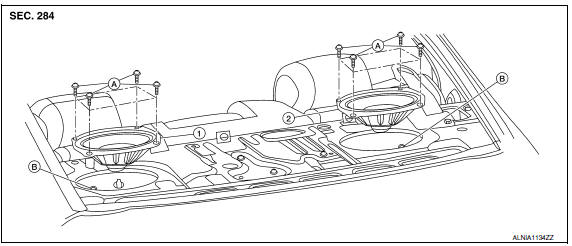
- Subwoofer (LH)
- Subwoofer (RH)
- Subwoofer screws
- Subwoofer connectors
REMOVAL
- Remove the rear parcel shelf finisher. Refer to INT-28, "Removal and Installation".
- Remove the subwoofer screws.
- Pull out the subwoofer, disconnect the harness connector from the subwoofer and remove.
INSTALLATION
Installation is in the reverse order of removal.
 Rear door speaker
Removal and Installation
REMOVAL
Remove the rear door finisher. Refer to INT-21, "Removal and
Installation".
Remove the rear door speaker screws (A).
Disconnect the harness c ...
 Bose speaker AMP
Removal and Installation
Bose speaker amp.
Screws
REMOVAL
NOTE:
If removing the BOSE speaker amp. bracket, it is necessary to remove the parcel
shelf finisher. The BOSE
speaker am ...
Other materials:
Fuel pressure
Inspection
FUEL PRESSURE RELEASE
With CONSULT
Turn ignition switch ON.
Perform "FUEL PRESSURE RELEASE" in "WORK SUPPORT" mode with
CONSULT.
Start engine.
After engine stalls, crank it two or three times to release all
fuel pressure.
Turn ignition switch OFF.
Without CONSULT
...
Driver Attention Alert system limitations
WARNING
Listed below are the system limitations for
the Driver Attention Alert system. Failure
to operate the vehicle in accordance with
these system limitations could result in
serious injury or death.
The Driver Attention Alert system may
not operate properly and may not provide
an alert i ...
Floor trim
Exploded View
Spacer (RH)
Spacer (LH)
Floor mat hook
Floor carpet
Harness clamp Front
Removal and Installation
REMOVAL
Disconnect the negative and positive battery terminals. Refer to
PG-68, "Removal and Installation (Battery Tray)".
Remove front seat (RH/LH). Refer t ...
Nissan Maxima Owners Manual
- Illustrated table of contents
- Safety-Seats, seat belts and supplemental restraint system
- Instruments and controls
- Pre-driving checks and adjustments
- Monitor, climate, audio, phone and voice recognition systems
- Starting and driving
- In case of emergency
- Appearance and care
- Do-it-yourself
- Maintenance and schedules
- Technical and consumer information
Nissan Maxima Service and Repair Manual

0.0154