
Nissan Maxima Service and Repair Manual: Hazard switch
Exploded View
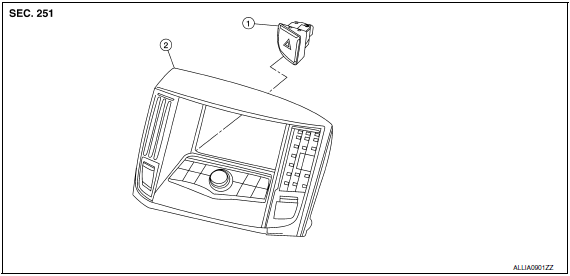
- Hazard switch
- Cluster lid D
Removal and Installation
REMOVAL
- Remove cluster lid D. Refer to IP-18, "Removal and Installation".
- Disconnect the harness connector from the hazard switch.
- Remove the hazard switch.
INSTALLATION
Installation is in the reverse order of remov
 Lighting & turn signal switch
Removal and Installation
NOTE: The lighting and turn signal switch is
integral with the combination switch assembly.
REMOVAL
Unlock steering wheel.
CAUTION:
Before servicing, disconnect ...
 Rear combination lamp
Exploded View
Slide clip
Grommets
Rear combination lamp
Removal and Installation
REAR COMBINATION LAMP
Removal
Remove the trunk side finisher. Refer to INT-36, "Exploded View".
...
Other materials:
Precaution
PRECAUTIONS
Precaution for Supplemental Restraint System (SRS) "AIR BAG" and "SEAT BELT
PRE-TENSIONER"
The Supplemental Restraint System such as "AIR BAG" and "SEAT BELT
PRE-TENSIONER", used along
with a front seat belt, helps to reduce the risk or severity of injury to the
driver and fron ...
Outside the vehicle
The maintenance items listed here should be
performed from time to time, unless otherwise
specified.
Doors and engine hood: Check that the doors
and engine hood operate properly. Also ensure
that all latches lock securely. Lubricate hinges,
latches, latch pins, rollers and links if necessary ...
Configuration (BCM)
CONFIGURATION (BCM) : Description
Vehicle specification needs to be written with CONSULT because it is not
written after replacing BCM.
Configuration has three functions as follows
Function
Description
"Before Replace ECU "
Reads the vehi ...
Nissan Maxima Owners Manual
- Illustrated table of contents
- Safety-Seats, seat belts and supplemental restraint system
- Instruments and controls
- Pre-driving checks and adjustments
- Monitor, climate, audio, phone and voice recognition systems
- Starting and driving
- In case of emergency
- Appearance and care
- Do-it-yourself
- Maintenance and schedules
- Technical and consumer information
Nissan Maxima Service and Repair Manual

0.011