
Nissan Maxima Service and Repair Manual: GPS antenna
Removal and Installation
REMOVAL
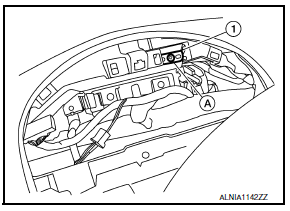
- Remove cluster lid A. Refer to IP-10, "Exploded View".
- Remove the audio unit. Refer to AV-652, "Removal and Installation".
- Remove the GPS antenna screw (A).
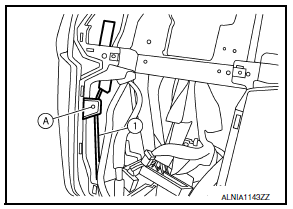
- GPS antenna (1) - Detach the GPS antenna cable clip (A), then fish the GPS antenna connector and harness (1), through the cluster lid A instrument panel opening and remove the GPS antenna.
INSTALLATION
Installation is in the reverse order of removal.
 Satellite radio antenna
Removal and Installation
REMOVAL
Lower the headlining at the rear. Refer to INT-33, "Exploded
View".
Disconnect the harness connector (A) from satellite radio
antenna.
Remove ...
 Steering switch
Removal and Installation
REMOVAL
Remove the driver airbag module. Refer to SR-12, "Removal and
Installation".
Remove the steering wheel audio control switch screws (A).
Relea ...
Other materials:
ECM branch line circuit
Diagnosis Procedure
1.CHECK CONNECTOR
Turn the ignition switch OFF.
Disconnect the battery cable from the negative terminal.
Check the following terminals and connectors for damage, bend and
loose connection (unit side and connector
side).
- Models without automatic drive positione ...
Automatic drive positioner control unit
Reference Value
TERMINAL LAYOUT
PHYSICAL VALUES
...
Diagnosis system (BCM)
COMMON ITEM
COMMON ITEM : CONSULT Function (BCM - COMMON ITEM)
APPLICATION ITEM
CONSULT performs the following functions via CAN communication with BCM
SYSTEM APPLICATION
BCM can perform the following functions.
HEADLAMP
HEADLAMP : CONSULT Function (BCM - HEAD LAMP)
DATA MONITOR
ACTIV ...
Nissan Maxima Owners Manual
- Illustrated table of contents
- Safety-Seats, seat belts and supplemental restraint system
- Instruments and controls
- Pre-driving checks and adjustments
- Monitor, climate, audio, phone and voice recognition systems
- Starting and driving
- In case of emergency
- Appearance and care
- Do-it-yourself
- Maintenance and schedules
- Technical and consumer information
Nissan Maxima Service and Repair Manual

0.0097