
Nissan Maxima Owners Manual: Jump starting
To start your engine with a booster battery, the instructions and precautions below must be followed.
WARNING
- If done incorrectly, jump starting can lead to a battery explosion, resulting in severe injury or death. It could also damage your vehicle.
- Explosive hydrogen gas is always present in the vicinity of the battery. Keep all sparks and flames away from the battery.
- Do not allow battery fluid to come into contact with eyes, skin, clothing or painted surfaces. Battery fluid is a corrosive sulfuric acid solution which can cause severe burns. If the fluid should come into contact with anything, immediately flush the contacted area with water.
- Keep battery out of the reach of children.
- The booster battery must be rated at 12 volts. Use of an improperly rated battery can damage your vehicle.
- Whenever working on or near a battery, always wear suitable eye protectors (for example, goggles or industrial safety spectacles) and remove rings, metal bands, or any other jewelry. Do not lean over the battery when jump starting.
- Do not attempt to jump start a frozen battery. It could explode and cause serious injury.
- Your vehicle has an automatic engine cooling fan. It could come on at any time. Keep hands and other objects away from it.
WARNING
Always follow the instructions below. Failure to do so could result in damage to the charging system and cause personal injury.
1. If the booster battery is in another vehicle, position the two vehicles to bring their batteries near each other.
Do not allow the two vehicles to touch.
2. Apply the parking brake. Move the shift lever to P (Park). Switch off all unnecessary electrical systems (lights, heater, air conditioner, etc.).
3. Ensure the vent caps are level and tight.
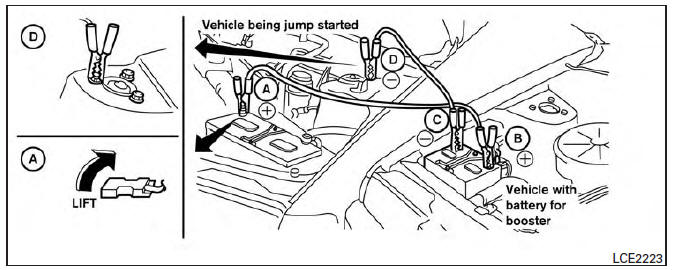
4. Connect the jumper cables in the sequence illustrated ( A , B , C , D ).
CAUTION
- Always connect positive ( + ) to positive (+ ) and negative ( - ) to body ground (for example, strut mounting bolt, engine lift bracket, etc.) - not to the battery.
- Make sure the jumper cables do not touch moving parts in the engine compartment and that the cable clamps do not contact any other metal.
5. Start the engine of the booster vehicle and let it run for a few minutes.
6. Keep the engine speed of the booster vehicle at about 2,000 rpm and start the engine of the vehicle being jump started.
CAUTION
Do not keep the starter motor engaged for more than 10 seconds. If the engine does not start right away, place the ignition switch in the OFF position and wait 3 to 4 seconds before trying again.
7. After starting the engine, carefully disconnect the negative cable and then the positive cable.
Push starting
CAUTION
- CVT models cannot be push-started or tow-started. Attempting to do so may cause transmission damage.
- Do not push start this vehicle. The three-way catalyst may be damaged.
 Installing the spare tire
The spare tire is designed for emergency
use. For additional information, refer to
"Wheels and tires" in the "Do-it-yourself"
section of this manual.
1. Clean any mud or dirt from the surface ...
 If your vehicle overheats
If your vehicle is overheating (indicated by an
extremely high temperature gauge reading) or if
you feel a lack of engine power, detect abnormal
noise, etc., take the following steps.
WARNING
...
Other materials:
On board diagnostic (OBD) system
Diagnosis Description
DESCRIPTION
The CVT system has two self-diagnostic systems.
The first is the emission-related on board diagnostic system (OBD-II) performed
by the TCM in combination
with the ECM. A malfunction is indicated by the MIL (Malfunction Indicator Lamp)
and is stored as a D ...
Front fender
Exploded View
Front fender
Removal and Installation
REMOVAL
Remove the front combination lamp. Refer to EXL-154, "Removal and
Installation".
Remove the fender protector. Refer to EXT-24, "Removal and
Installation".
Remove cowl top side trim cover. EXT- ...
P0138, P0158 HO2S2
Description
The heated oxygen sensor 2, after three way catalyst (manifold),
monitors the oxygen level in the exhaust gas on each bank.
Even if switching characteristics of the air fuel ratio (A/F) sensor 1
are shifted, the air-fuel ratio is controlled to stoichiometric, by the signal
...
Nissan Maxima Owners Manual
- Illustrated table of contents
- Safety-Seats, seat belts and supplemental restraint system
- Instruments and controls
- Pre-driving checks and adjustments
- Monitor, climate, audio, phone and voice recognition systems
- Starting and driving
- In case of emergency
- Appearance and care
- Do-it-yourself
- Maintenance and schedules
- Technical and consumer information
Nissan Maxima Service and Repair Manual

0.0225