
Nissan Maxima Service and Repair Manual: Air Cleaner And Air Duct
Removal and Installation
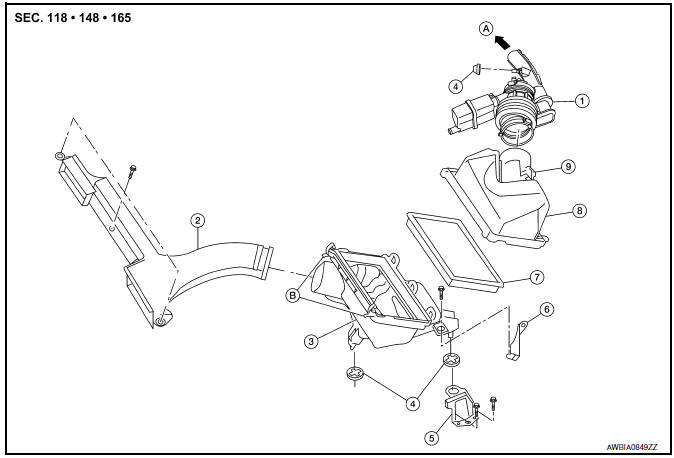
- Air duct hose and resonator assembly
- Front air duct
- Air cleaner case (lower)
- Grommets
- Air cleaner case mounting bracket
- Bracket
- Air cleaner filter
- Air cleaner case (upper)
- Mass air flow sensor
- To electric throttle control actuator
- Air cleaner case side clips
REMOVAL
- Remove engine room cover. Refer to EM-23, "Removal and Installation".
- Remove front air duct.
- Disconnect the tube clamp at the electric throttle control actuator and at the air duct hose and resonator assembly.
- Disconnect the blow-by hose.
- Remove air duct hose and resonator assembly.
- Disconnect mass air flow sensor.
- Remove mass air flow sensor from air cleaner case (upper), as necessary.
CAUTION: Handle mass air flow sensor with care.
- Do not shock it.
- Do not disassemble it.
- Do not touch its sensor.
- Disconnect transaxle breather.
- Remove air cleaner case assembly.
INSTALLATION
Installation is in the reverse order of removal.
 Engine Room Cover
Removal and Installation
CAUTION: Do not damage or scratch engine
room cover when installing or removing.
REMOVAL
Remove the engine room cover bolts and engine room cover.
INSTALLATION
I ...
 Intake Manifold Collector
Removal and Installation
Intake manifold collector
Intake manifold collector gasket
Electric throttle control actuator gasket
Electric throttle control actuator
Refer to INSTALLATION ...
Other materials:
C1130, C1131, C1132, C1133, C1136 engine signal
Description
ABS actuator and electric unit (control unit) and ECM exchange the engine
signal with CAN communication
line.
DTC Logic
DTC DETECTION LOGIC
DTC CONFIRMATION PROCEDURE
1.CHECK SELF-DIAGNOSIS RESULTS
Check the self-diagnosis results.
Diagnosis Procedure
1.CHECK ENGINE S ...
Maintenance schedules
To help ensure smooth, safe and economical
driving, NISSAN provides two maintenance
schedules that may be used, depending upon the
conditions in which you usually drive. These
schedules contain both distance and time intervals,
up to 120,000 miles
(192,000 km)/144 months. For most people, the
...
Diagnosis system (BCM)
COMMON ITEM
COMMON ITEM : CONSULT Function (BCM - COMMON ITEM)
APPLICATION ITEM
CONSULT performs the following functions via CAN communication with BCM.
SYSTEM APPLICATION
BCM can perform the following functions.
HEADLAMP
HEADLAMP : CONSULT Function (BCM - HEAD LAMP)
DATA MONITOR
ACTI ...
Nissan Maxima Owners Manual
- Illustrated table of contents
- Safety-Seats, seat belts and supplemental restraint system
- Instruments and controls
- Pre-driving checks and adjustments
- Monitor, climate, audio, phone and voice recognition systems
- Starting and driving
- In case of emergency
- Appearance and care
- Do-it-yourself
- Maintenance and schedules
- Technical and consumer information
Nissan Maxima Service and Repair Manual

0.014