
Nissan Maxima Owners Manual: Speedometer and odometer
This vehicle is equipped with a speedometer and odometer. The speedometer is located on the right side of the meter cluster. The odometer is located within the vehicle information display.
Speedometer
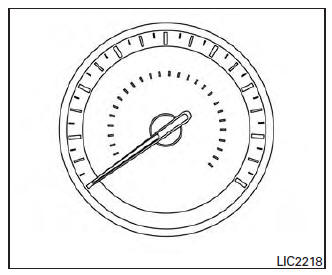
The speedometer indicates vehicle speed.
Odometer/Twin trip odometer
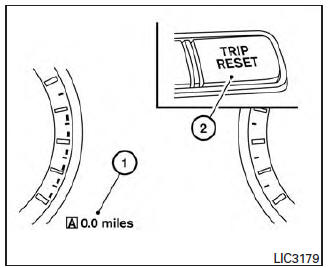
The odometer and the twin trip odometer 1 are displayed in the vehicle information display when the ignition switch is placed in the ON position.
The odometer records the total distance the vehicle has been driven.
The twin trip odometer records the distance of individual trips.
Changing the display
Push the TRIP RESET 2 switch on the left side of the instrument panel to change the display as follows: Trip A →Trip B→Odometer Mileage→ Trip A
Resetting the trip odometer
Pushing the TRIP RESET switch 2 for more than 1 second resets the currently displayed trip odometer to zero.
Average fuel economy and distance to empty information is also available. For additional information, refer to "Vehicle information display" in this section.
 Meters and gauges
Tachometer
Warning and indicator lights
Vehicle information display. Odometer. Twin trip odometer
Speedometer
Fuel gauge
Engine coolant temperature gauge
...
 Tachometer
The tachometer indicates engine speed in revolutions
per minute (rpm). Do not rev engine into
the red zone 1 .
CAUTION
When engine speed approaches the red
zone, reduce engine speed. Operating ...
Other materials:
B1017 - B1022 occupant classification system
Description
DTC B1017 - B1022 OCCUPANT CLASSIFICATION SYSTEM (OCS)
The occupant classification system control unit is wired to the air bag
diagnosis sensor unit. The air bag diagnosissensor unit will monitor the
occupant classification system for control unit and sensor mat failures and
inter ...
ABS function does not operate
Diagnosis Procedure
CAUTION:
ABS does not operate when speed is 10 km/h (6 MPH) or lower.
1.CHECK ABS WARNING LAMP DISPLAY
Make sure that the ABS warning lamp turns OFF after ignition switch is turned
on or when driving
2.CHECK WHEEL SENSOR AND SENSOR ROTOR
Check the following:
Wheel se ...
Precautions on booster seats
WARNING
If a booster seat and seat belt are not used
properly, the risk of a child being injured
or killed in a sudden stop or collision
greatly increases:
Make sure the shoulder portion of
the belt is away from the child's face
and neck and the lap portion of the
belt does not cross t ...
Nissan Maxima Owners Manual
- Illustrated table of contents
- Safety-Seats, seat belts and supplemental restraint system
- Instruments and controls
- Pre-driving checks and adjustments
- Monitor, climate, audio, phone and voice recognition systems
- Starting and driving
- In case of emergency
- Appearance and care
- Do-it-yourself
- Maintenance and schedules
- Technical and consumer information
Nissan Maxima Service and Repair Manual

0.0081