
Nissan Maxima Service and Repair Manual: Basic inspection
DIAGNOSIS AND REPAIR WORKFLOW
Work Flow (With GR8-1200 NI)
STARTING SYSTEM DIAGNOSIS WITH GR8-1200 NI
To test the starting system, use the following special service tool:
- GR8-1200 NI Multitasking battery and electrical diagnostic station
NOTE: Refer to the diagnostic station Instruction Manual for proper starting system diagnosis procedures
OVERALL SEQUENCE
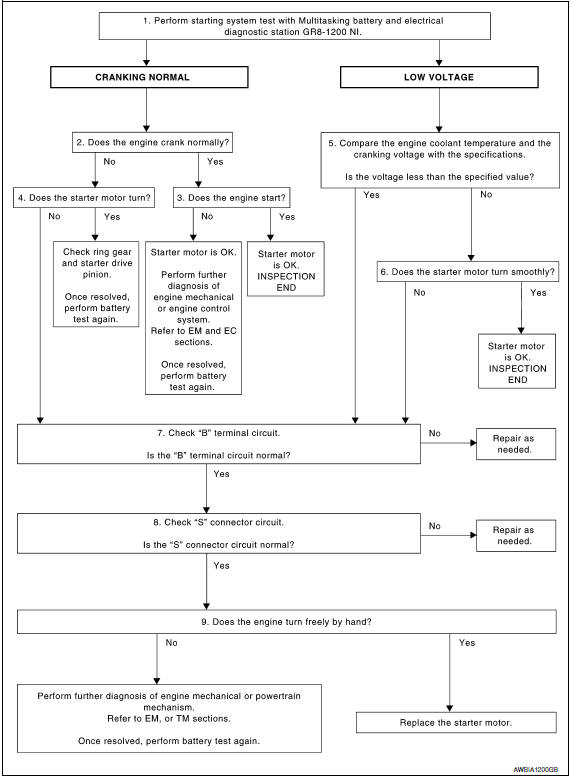
DETAILED FLOW
NOTE: To ensure a complete and thorough diagnosis, the battery, starter motor and generator test segments must be done as a set from start to finish.
1.DIAGNOSIS WITH MULTITASKING BATTERY AND ELECTRICAL DIAGNOSTIC STATION GR8-1200 NI
Perform the starting system test with Multitasking battery and electrical diagnostic station GR8-1200 NI. For details and operating instructions, refer to diagnostic station Instruction Manual.
2.CRANKING CHECK
Check that the starter motor operates properly.
3.ENGINE START CHECK
Check that the engine starts.
4.STARTER MOTOR ACTIVATION
Check that the starter motor operates.
5.COMPARISON BETWEEN ENGINE COOLANT AND CRANKING VOLTAGE
Compare the engine coolant temperature and verify the cranking voltage is within specifications.
Minimum Specification of Cranking Voltage Referencing Coolant Temperature

6.STARTER OPERATION
Check the starter operation.
7."B" TERMINAL CIRCUIT INSPECTION
Check "B" terminal circuit.
8."S" CONNECTOR CIRCUIT INSPECTION
Check "S" connector circuit.
9.ENGINE ROTATION STATUS
Check that the engine can be rotated by hand.
Work Flow (Without GR8-1200 NI)
OVERALL SEQUENCE
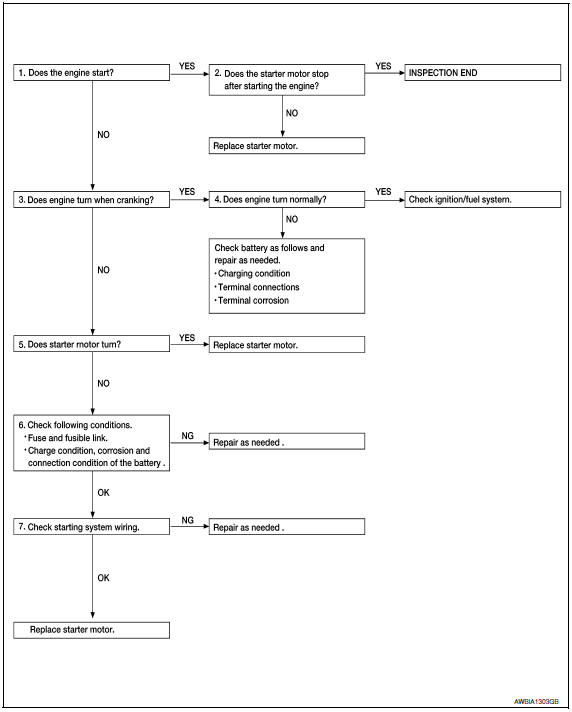
DETAILED FLOW
NOTE: If any malfunction is found, immediately disconnect the battery cable from the negative terminal.
1.CHECK ENGINE START
Crank the engine and check that the engine starts.
2.CHECK THAT THE STARTER MOTOR STOPS
Check that the starter motor stops after starting the engine.
3.CHECK THAT THE ENGINE TURNS WHEN CRANKING
Check that the engine turns when cranking.
4.CHECK THE ENGINE SPEED WHEN CRANKING
Check that the engine speed is not low when cranking.
5.CHECK STARTER MOTOR ACTIVATION
Check that the starter motor runs at cranking.
6.CHECK POWER SUPPLY CIRCUIT
Check the following conditions:
- Fuse and fusible link
- Charge condition, corrosion and connection of the battery
7.CHECK STARTING SYSTEM WIRING
Check the following:
- "B" terminal circuit. Refer to STR-9, "Diagnosis Procedure".
- "S" terminal circuit
 Starting system
...
 System description
STARTING SYSTEM
System Diagram
System Description
The starter motor plunger closes and provides a closed circuit between the
battery and the starter motor. The starter motor is grounded to the ...
Other materials:
Driver Attention Alert (if so equipped)
WARNING
Failure to follow the warnings and instructions
for proper use of the Driver Attention
Alert system could result in serious injury
or death.
The Driver Attention Alert system is only
a warning to inform the driver of a potential
lack of driver attention or
drowsiness. It will not ste ...
VDC off indicator lamp
Description
Component Function Check
1.VDC OFF INDICATOR LAMP OPERATION CHECK 1
Check that the lamp illuminates for approximately 2 seconds after the
ignition switch is turned ON.
2.VDC OFF INDICATOR LAMP OPERATION CHECK 2
Check that the VDC OFF indicator lamp in the combination meter tur ...
Removal and installation
FUEL LEVEL SENSOR UNIT, FUEL FILTER AND FUEL PUMP ASSEMBLY
Exploded View
Lock ring
Fuel level sensor, fuel filter and fuel pump assembly
O-ring
Fuel tank Front
Removal and Installation
WARNING: Read "General Precautions" before
working on the fuel system. Refer to G ...
Nissan Maxima Owners Manual
- Illustrated table of contents
- Safety-Seats, seat belts and supplemental restraint system
- Instruments and controls
- Pre-driving checks and adjustments
- Monitor, climate, audio, phone and voice recognition systems
- Starting and driving
- In case of emergency
- Appearance and care
- Do-it-yourself
- Maintenance and schedules
- Technical and consumer information
Nissan Maxima Service and Repair Manual

0.0064