
Nissan Maxima Service and Repair Manual: Symptom diagnosis
NOISE, VIBRATION AND HARSHNESS (NVH) TROUBLESHOOTING
NVH Troubleshooting Chart
Use the chart below to help you find the cause of the symptom. If necessary, repair or replace these parts.
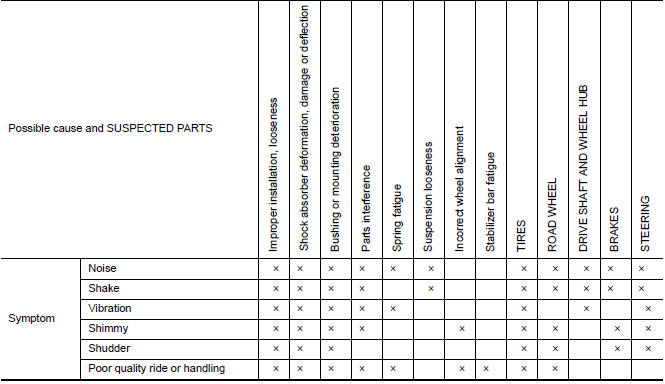
×: Applicable
 Preparation
PREPARATION
Special Service Tool
The actual shapes of the tools may differ from those illustrated here.
Commercial Service Tool
...
 Periodic maintenance
FRONT SUSPENSION ASSEMBLY
Inspection and Adjustment
INSPECTION
Make sure the mounting conditions (looseness, backlash) of each component and
component conditions (wear, damage) are normal.
LOWER ...
Other materials:
B2578, B2579 in-vehicle sensor
Description
In-vehicle Sensor
The in-vehicle sensor (1) is located on instrument lower cover
(LH).
It converts variations in compartment air temperature drawn from
the aspirator into a resistance value. It is then input into the A/C
auto amp.
In-vehicle Sensor Circuit
Aspira ...
Body control system
System Description
OUTLINE
ECU DIAGNOSIS INFORMATION controls the various electrical
components. It inputs the information required to
the control from CAN communication and the signal received from each switch
and sensor.
BCM has combination switch reading function for reading the
...
B2634, B2635 air mix door motor (passenger side)
Description
COMPONENT DESCRIPTION
Air Mix Door Motor (Passenger Side)
The air mix door motor (passenger side) (1) is attached to the
heater & cooling unit assembly.
It rotates so that the air mix door is opened or closed to a
position
set by the A/C auto amp.
Motor rotation is t ...
Nissan Maxima Owners Manual
- Illustrated table of contents
- Safety-Seats, seat belts and supplemental restraint system
- Instruments and controls
- Pre-driving checks and adjustments
- Monitor, climate, audio, phone and voice recognition systems
- Starting and driving
- In case of emergency
- Appearance and care
- Do-it-yourself
- Maintenance and schedules
- Technical and consumer information
Nissan Maxima Service and Repair Manual

0.0075