
Nissan Maxima Service and Repair Manual: Low tire pressure warning lamp blinks
Low Tire Pressure Warning Lamp Flashes When Ignition Switch Is Turned On
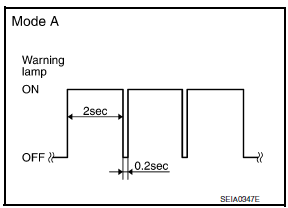
NOTE: If low tire pressure warning lamp flashes as shown, the system is normal.
Flash Mode A
- This mode shows transmitter status is OFF-mode.
Carry out transmitter wake up operation.
DIAGNOSTIC PROCEDURE
1.CHECK BCM CONNECTORS
- Turn ignition switch OFF.
- Disconnect BCM harness connectors.
- Check terminals for damage or loose connections.
2.CHECK TIRE PRESSURE WARNING CHECK CONNECTOR CIRCUIT
Check continuity between BCM harness connector M18 terminal 57 and ground.
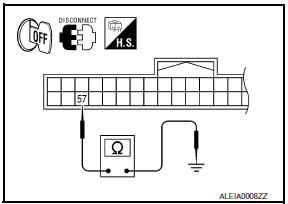
Continuity should not exist.
 Low tire pressure warning lamp stays on
Low Tire Pressure Warning Lamp Stays On When Ignition Switch Is
Turned On
DIAGNOSTIC PROCEDURE
1.CHECK BCM CONNECTORS
Turn ignition switch OFF.
Disconnect BCM harness connectors.
Check ter ...
 Hazard warning lamps flash
Hazard Warning Lamps Flash When Ignition Switch Is Turned On
DIAGNOSTIC PROCEDURE
1.CHECK BCM GROUND CIRCUIT
Check BCM ground circuit. ...
Other materials:
Windshield glass
Exploded View
Windshield glass
Spacer
Mirror base
Adhesive
Primer
Windshield molding
Metal roof
Dual Panel Sunroof
Front pillar
Cowl top
Rubber dam G.
16 mm (0.63 in) for top and sides 25 mm
(0.98 in) for bottom
12 + 2, - 0 mm (0.47 + 0.08 - 0 in)
&n ...
Line pressure test
Inspection and Judgment
INSPECTION
Line Pressure Test Procedure
Inspect the amount of engine oil and replenish
if necessary.
Drive the car for about 10 minutes to warm it
up so that the CVT fluid reaches in the range of 50 to 80C
(122 to 176F). Then inspect the ...
Recommended fluids/lubricants and capacities
The following are approximate capacities. The actual refill capacities may
be slightly different. When refilling, follow the procedure
described in the "Do-it-yourself" section to determine the proper refill
capacity.
...
Nissan Maxima Owners Manual
- Illustrated table of contents
- Safety-Seats, seat belts and supplemental restraint system
- Instruments and controls
- Pre-driving checks and adjustments
- Monitor, climate, audio, phone and voice recognition systems
- Starting and driving
- In case of emergency
- Appearance and care
- Do-it-yourself
- Maintenance and schedules
- Technical and consumer information
Nissan Maxima Service and Repair Manual

0.0081