
Nissan Maxima Service and Repair Manual: Preparation
PREPARATION
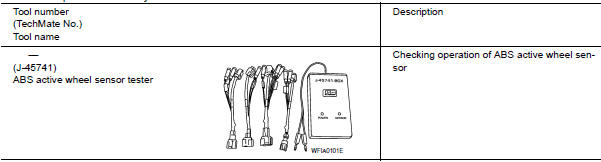
Special Service Tool
The actual shapes of the tools may differ from those illustrated here.
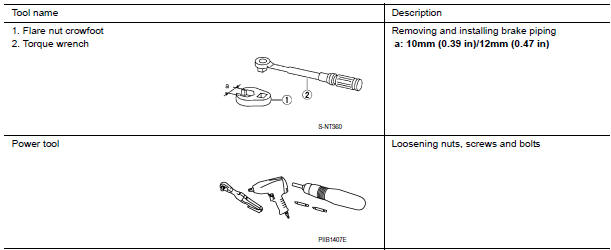
Commercial Service Tool
 Precaution
PRECAUTIONS
Precaution for Supplemental Restraint System (SRS) "AIR BAG" and "SEAT
BELT
PRE-TENSIONER"
The Supplemental Restraint System such as "AIR BAG" and "SEAT BELT PRE- ...

Other materials:
Seat belt extenders
If, because of body size or driving position, it is
not possible to properly fit the lap/shoulder belt
and fasten it, an extender that is compatible with
the installed seat belts is available for purchase.
The extender adds approximately 8 in (200 mm)
of length and may be used for either the ...
Unit disassembly and assembly
TORQUE CONVERTER
Exploded View
Torque converter
Transaxle assembly
Disassembly
Remove transaxle assembly. Refer to TM-188,
"Exploded View".
Remove torque converter from transaxle
assembly.
Assembly
Note the following, and i ...
P1726 throttle control signal
Description
The electric throttle control actuator consists of
throttle control motor, accelerator pedal position sensor, throttle
position sensor, etc. The actuator sends a signal to the ECM, and ECM sends the
signal to TCM via CAN
communication.
DTC Logic
DTC DETECTION LOGIC
DTC CONF ...
Nissan Maxima Owners Manual
- Illustrated table of contents
- Safety-Seats, seat belts and supplemental restraint system
- Instruments and controls
- Pre-driving checks and adjustments
- Monitor, climate, audio, phone and voice recognition systems
- Starting and driving
- In case of emergency
- Appearance and care
- Do-it-yourself
- Maintenance and schedules
- Technical and consumer information
Nissan Maxima Service and Repair Manual

0.0095