
Nissan Maxima Service and Repair Manual: Intake door control system
System Diagram
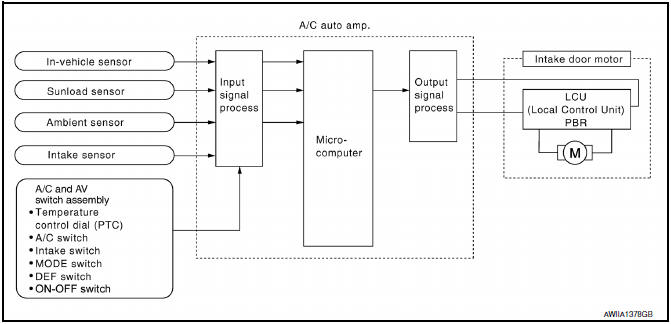
System Description
The intake doors are automatically controlled by the temperature setting, ambient temperature, in-vehicle temperature, intake temperature, amount of sunload and ON/OFF operation of the compressor.
SYSTEM OPERATION
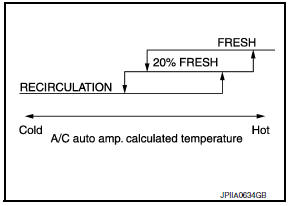
The intake door control judges intake door position based on the ambient temperature, the intake air temperature and the in-vehicle temperature. When in shifting mode position D/F, if the DEF or OFF switches are pressed, or when the A/C switch is OFF, the A/C auto amp. sets the intake door to the FRE position.
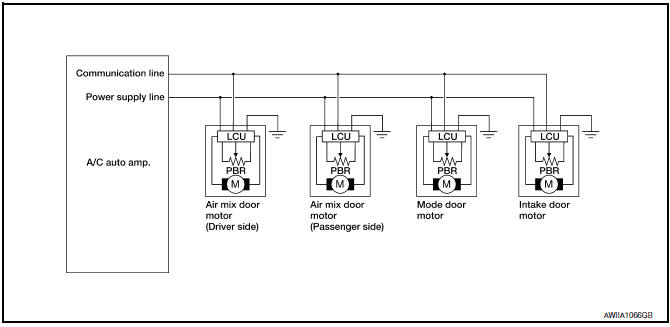
Door Motor Circuit
Intake Door Control Specification
 Air mix door control system
System Diagram
System Description
The air mix doors are automatically controlled so that in-vehicle temperature
is maintained at a predetermined
value by the temperature setting, ambient temp ...
 Blower motor control system
System Diagram
System Description
Fan speed is automatically controlled by the temperature setting, ambient
temperature, in-vehicle temperature,
intake temperature, amount of sunload and air ...
Other materials:
Selecting the correct oil
It is essential to choose the correct grade, quality
and viscosity engine oil to ensure satisfactory
engine life and performance. For additional information,
refer to "Recommended fluids/lubricants
and capacities" in this section. NISSAN recommends
the use of an energy conserving oil in
or ...
B2614 ACC relay circuit
Description
BCM controls the various electrical components and simultaneously supplies
power according to the power
supply position.
BCM checks the power supply position internally.
DTC Logic
DTC DETECTION LOGIC
DTC CONFIRMATION PROCEDURE
1. PERFORM DTC CONFIRMATION PROCEDURE
Tur ...
Fog lights
Replacing the fog light bulb
If fog light bulb replacement is required, it is
recommended that you visit a NISSAN dealer for
this service.
CAUTION
High pressure halogen gas is sealed
inside the halogen bulb. The bulb may
break if the glass envelope is scratched
or the bulb is dropped.
...
Nissan Maxima Owners Manual
- Illustrated table of contents
- Safety-Seats, seat belts and supplemental restraint system
- Instruments and controls
- Pre-driving checks and adjustments
- Monitor, climate, audio, phone and voice recognition systems
- Starting and driving
- In case of emergency
- Appearance and care
- Do-it-yourself
- Maintenance and schedules
- Technical and consumer information
Nissan Maxima Service and Repair Manual

0.0118