
Nissan Maxima Service and Repair Manual: Diagnosis system (HVAC)
CONSULT Function
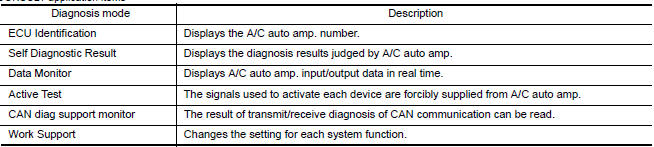
CONSULT can display each diagnosis item using the diagnosis test modes as shown.
CONSULT application items
SELF DIAGNOSTIC RESULT
Display Item List
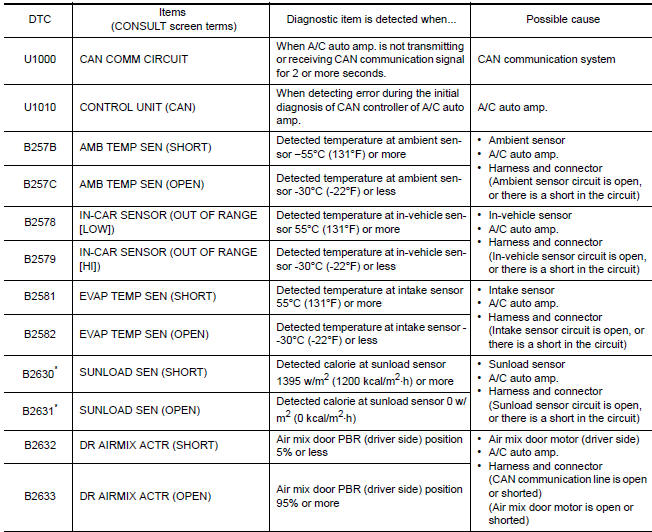
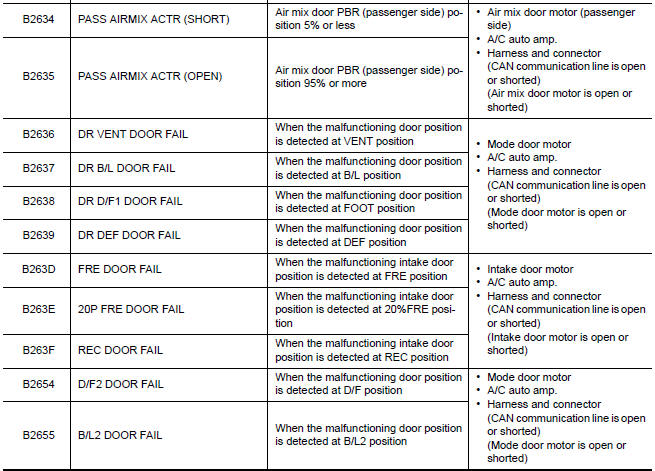
*: Perform self-diagnosis under sunshine. When performing indoors, aim a light (more than 60 W) at sunload sensor, otherwise self-diagnosis indicates a DTC even though the sunload sensor is functioning normally.
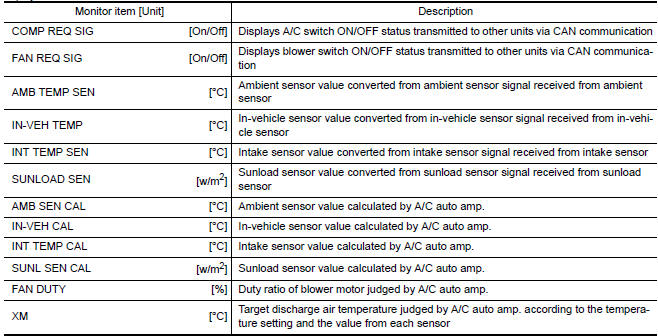
DATA MONITOR
Display item list

ACTIVE TEST

HVAC TEST
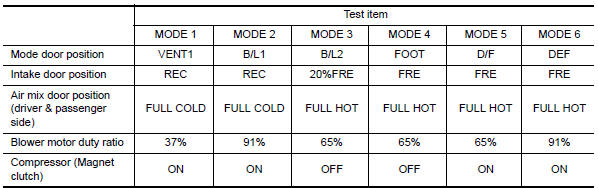
NOTE: Perform the inspection of each output device after starting the engine because the compressor is operating.
WORK SUPPORT
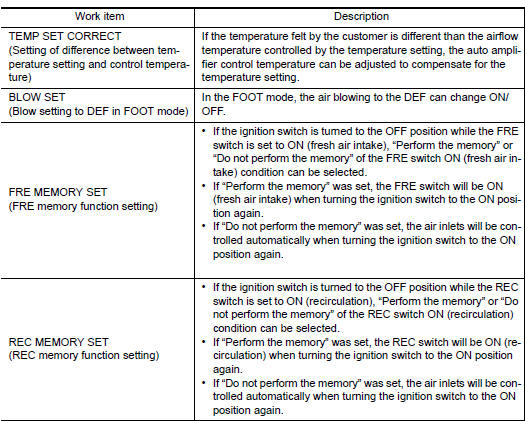
When the battery cable is disconnected from the negative terminal or when the battery voltage becomes 10V or less, the setting of WORK SUPPORT may be cancelled.
 CAN communication system
System Description
CAN (Controller Area Network) is a serial communication line for real time
application. It is an on-vehicle multiplex
communication line with high data communication speed and e ...

Other materials:
ABS branch line circuit
Diagnosis Procedure
1.CHECK CONNECTOR
Turn the ignition switch OFF.
Disconnect the battery cable from the negative terminal.
Check the terminals and connectors of the ABS actuator and
electric unit (control unit) for damage, bend
and loose connection (unit side and connector side).
...
Insufficient heating
Component Function Check
Symptom
Insufficient heating
No warm air comes out. (Airflow volume is normal.)
INSPECTION FLOW
1. CONFIRM SYMPTOM BY PERFORMING OPERATION CHECK - TEMPERATURE INCREASE
Press the AUTO switch.
Turn temperature control dial (driver side) clockwise until 32C
...
System temporarily unavailable
The following are conditions in which the ICC
system may be temporarily unavailable. In these
instances, the ICC system may not cancel and
may not be able to maintain the selected following
distance from the vehicle ahead.
Condition A
Under the following conditions, the ICC system is
auto ...
Nissan Maxima Owners Manual
- Illustrated table of contents
- Safety-Seats, seat belts and supplemental restraint system
- Instruments and controls
- Pre-driving checks and adjustments
- Monitor, climate, audio, phone and voice recognition systems
- Starting and driving
- In case of emergency
- Appearance and care
- Do-it-yourself
- Maintenance and schedules
- Technical and consumer information
Nissan Maxima Service and Repair Manual

0.029