
Nissan Maxima Service and Repair Manual: Diagnosis system (HVAC)
CONSULT Function
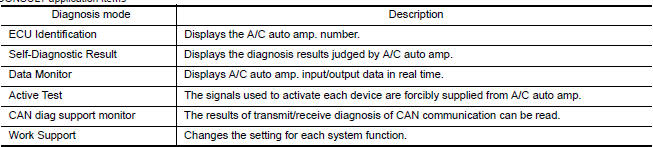
CONSULT can display each diagnosis item using the diagnosis test modes as shown.
CONSULT application items
SELF-DIAGNOSTIC RESULT
Display Item List
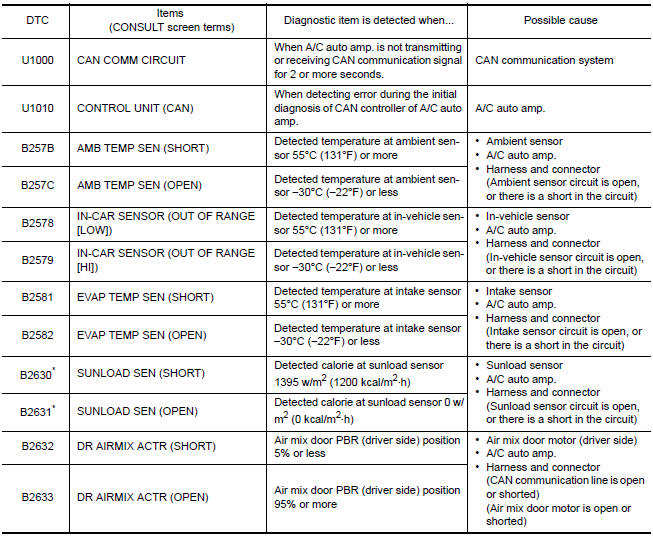
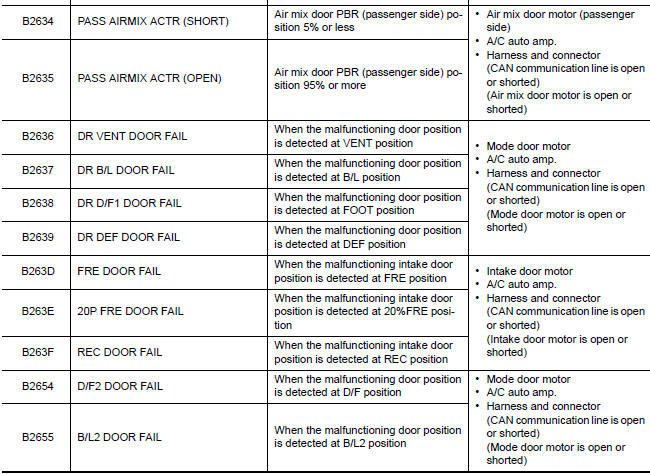
*: Perform self-diagnosis under sunshine. When performing indoors, aim a light (more than 60 W) at sunload sensor, otherwise self-diagnosis reports an error even though the sunload sensor is functioning normally.
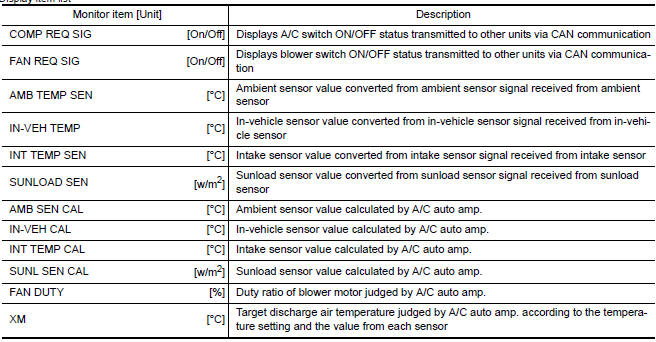
DATA MONITOR
Display item list

ACTIVE TEST

HVAC TEST
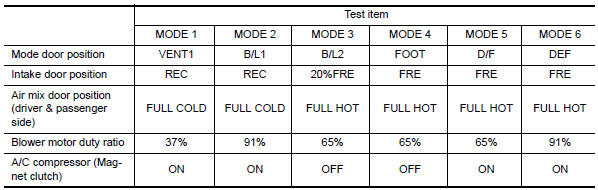
NOTE: Perform the inspection of each output device after starting the engine, because the A/C compressor has been operating.
WORK SUPPORT
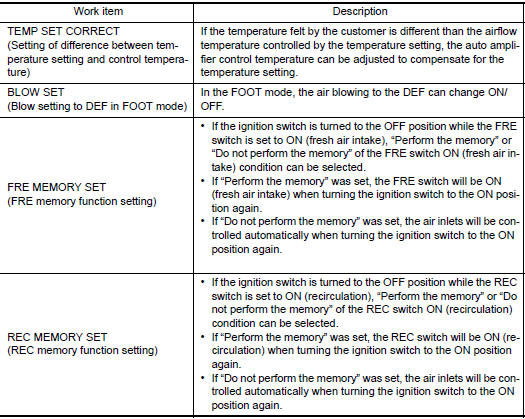
When the battery cable is disconnected from the negative terminal or when the battery voltage becomes 10V or less, the setting of WORK SUPPORT may be cancelled.
 Can communication system
System Description
CAN (Controller Area Network) is a serial communication line for real time
application. It is an on-vehicle multiplex
communication line with high data communication speed and e ...

Other materials:
Memory Storage Function (Key-Link)
Use the following process to setup key-link:
1. Unlock the vehicle with the desired Intelligent
Key while the ignition is OFF.
2. Place the ignition in the ON position.
3. Within the "Settings" menu of the vehicle
information display, select "Key-Linked Settings"
and press the OK butto ...
P0451 evap control system pressure sensor
Description
The EVAP control system pressure sensor detects pressure in the
purge line. The sensor output voltage to the ECM increases as pressure
increases
DTC Logic
DTC DETECTION LOGIC
DTC CONFIRMATION PROCEDURE
NOTE:
Never remove fuel filler cap during DTC confirmation procedur ...
Headlamp (HI) circuit
Description
The IPDM E/R (intelligent power distribution module engine room) controls the
headlamp high relay based on inputs from the BCM over the CAN communication
lines. When the headlamp high relay is energized, power flows through fuses
48 and 49, located in the IPDM E/R. Power then flow ...
Nissan Maxima Owners Manual
- Illustrated table of contents
- Safety-Seats, seat belts and supplemental restraint system
- Instruments and controls
- Pre-driving checks and adjustments
- Monitor, climate, audio, phone and voice recognition systems
- Starting and driving
- In case of emergency
- Appearance and care
- Do-it-yourself
- Maintenance and schedules
- Technical and consumer information
Nissan Maxima Service and Repair Manual

0.0086