
Nissan Maxima Service and Repair Manual: Power supply and ground circuit
A/C AUTO AMP.
A/C AUTO AMP.: Description
COMPONENT DESCRIPTION
A/C Auto Amp. (Air Conditioner Automatic Amplifier)
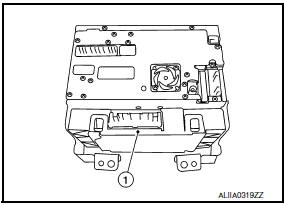
The A/C auto amp. (1) has a built-in microcomputer that processes information sent from various sensors needed for air conditioner operation. The air mix door motor(s), the mode door motor, the intake door motor, the blower motor and the A/C compressor are then controlled.
When the various switches and temperature control switches are operated, data is input to the A/C auto amp. from the AV switch assembly using CAN communication.
The A/C auto amp. is operated with control mechanisms. Signals from various switches and Potentio Temperature Control (PTC) are directly entered into the A/C auto amp.
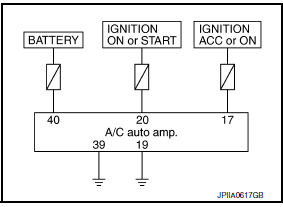
Power Supply and Ground Circuit for A/C Auto Amp.
A/C AUTO AMP.: Component Function Check
1.CHECK OPERATION
- Press the AUTO switch, and then check that "AUTO" is shown on the display.
- Operate the temperature control switch (driver side). Check that the fan speed or outlet changes. (The discharge air temperature or fan speed varies depending on the ambient temperature, in-vehicle temperature, and temperature setting.)
A/C AUTO AMP.: Diagnosis Procedure
1.CHECK A/C AUTO AMP. POWER SUPPLY
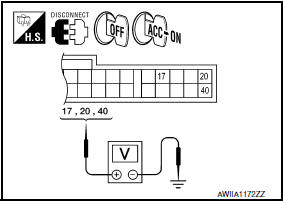
- Turn ignition switch OFF.
- Disconnect the A/C auto amp. connector.
- Turn ignition switch ON.
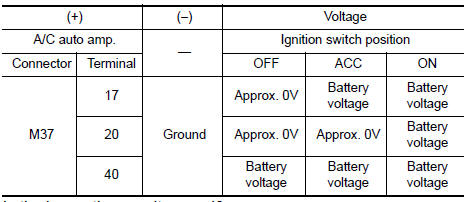
- Check voltage between A/C auto amp. harness connector M37 terminals 17, 20, 40 and ground.
2.CHECK FUSE
Check 10A fuses [Nos. 3, 6 and 17, located in the fuse block (J/B)].
3.CHECK A/C AUTO AMP. GROUND CIRCUIT
- Turn ignition switch OFF.
- Check continuity between A/C auto amp. harness connector M37 terminals 19, 39 and ground.
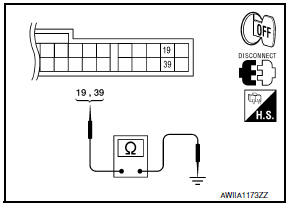
19, 39 - Ground: Continuity should exist
A/C SWITCH ASSEMBLY
A/C SWITCH ASSEMBLY: Component Function Check
1.CHECK OPERATION
- Press the AUTO switch, and then check that "AUTO" is shown on the display.
- Operate the temperature control switch (driver side). Check that the fan speed or outlet changes. (The discharge air temperature or fan speed varies depending on the ambient temperature, in-vehicle temperature, and temperature setting.)
A/C SWITCH ASSEMBLY: Diagnosis Procedure
1.CHECK A/C SWITCH ASSEMBLY POWER SUPPLY
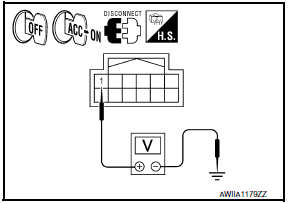
- Disconnect the A/C switch assembly connector.
- Turn ignition switch ON.
- Check voltage between A/C switch assembly harness connector M104 terminal 1 and ground.
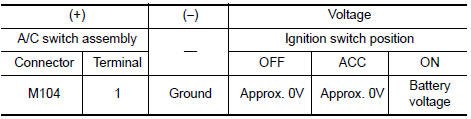
2.CHECK FUSE
Check 10A fuse [No.3, located in the fuse block (J/B)].
3.CHECK A/C SWITCH ASSEMBLY GROUND CIRCUIT
- Turn ignition switch OFF.
- Check continuity between A/C switch assembly harness connector M104 terminal 2 and ground.
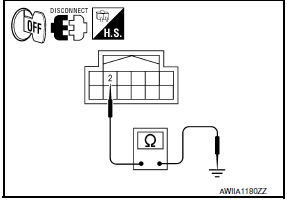
2 - Ground: Continuity should exist.
A/C DISPLAY UNIT
A/C DISPLAY UNIT: Diagnosis Procedure
1.CHECK A/C DISPLAY UNIT POWER SUPPLY CIRCUIT
- Disconnect the A/C display unit connector.
- Turn ignition switch ON.
- Check voltage between A/C display unit harness connector M101 terminal 6 and ground.
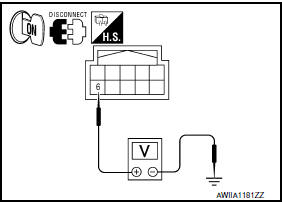
6 - Ground: Battery voltage
2.CHECK GROUND CIRCUIT FOR A/C DISPLAY UNIT
- Turn ignition switch OFF.
- Check continuity between A/C display unit harness connector M101 terminal 1 and ground.
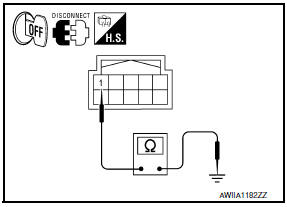
1 - Ground: Continuity should exist
 A/C switch assembly signal circuit
Diagnosis Procedure
1.CHECK WITH SELF-DIAGNOSIS FUNCTION OF CONSULT
Using CONSULT, perform "SELF-DIAGNOSIS RESULTS" of HVAC.
Check if any DTC No. is displayed in the self-diagnosis results.
...
 ECU diagnosis information
A/C AUTO AMP.
Reference Value
VALUES ON THE DIAGNOSIS TOOL
CONSULT MONITOR ITEM
A/C AUTO AMP. HARNESS CONNECTOR TERMINAL LAYOUT
TERMINALS AND REFERENCE VALUES FOR A/C AUTO AMP.
D ...
Other materials:
Power supply and ground circuit
Description
EPS system functions by ignition power supply.
Diagnosis Procedure
1.CHECK POWER SUPPLY
Turn the ignition switch OFF.
Disconnect power steering control unit connector.
Turn the ignition switch ON.
Check voltage between power steering control unit connectorM59
terminal 3 ...
Back-up lamp
Wiring Diagram
...
Pre-inspection for diagnostic
Pre-Inspection for Multi-System Diagnostic
The engine start function, door lock function, power distribution system and
NATS-IVIS/NVIS are closely
related to each other. Narrow down the system in question by performing this
inspection to identify which system
is malfunctioning. For example, ...
Nissan Maxima Owners Manual
- Illustrated table of contents
- Safety-Seats, seat belts and supplemental restraint system
- Instruments and controls
- Pre-driving checks and adjustments
- Monitor, climate, audio, phone and voice recognition systems
- Starting and driving
- In case of emergency
- Appearance and care
- Do-it-yourself
- Maintenance and schedules
- Technical and consumer information
Nissan Maxima Service and Repair Manual

0.0086