
Nissan Maxima Service and Repair Manual: Control unit
Removal and Installation
A/C SWITCH ASSEMBLY
Removal
- Remove cluster lid D. Refer to IP-10, "Exploded View".
- Remove the A/C switch assembly from cluster lid D.
Installation
Installation is in the reverse order of removal.
A/C AUTO AMP.
Removal
- Remove the audio unit.
- Refer to AV-73, "Removal and Installation" (BASE AUDIO).
- Refer to AV-161, "Removal and Installation" (BOSE W/MONOCHROME DISPLAY).
- Remove the two A/C auto amp. bracket screws.
- Remove the A/C auto amp. (1) from the bracket.
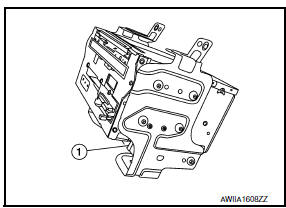
Installation
Installation is in the reverse order of removal.

 Ambient sensor
Removal and Installation
REMOVAL
From under the vehicle, disconnect the harness connector from the
ambient sensor.
Release the ambient sensor clip and remove the ambient sensor
(1).
I ...
Other materials:
Emission Control System Maintenance
Drive belts*:
Check engine drive belts for wear, fraying or
cracking and for proper tension. Replace any
damaged drive belts.
Engine air filter:
Replace at specified intervals. When driving for
prolonged periods in dusty conditions,
check/replace the filter more frequently.
Engine coolant*:
...
P0014, P0024 EVT control
DTC Logic
DTC DETECTION LOGIC
NOTE:
If DTC P0014 or P0024 is displayed with DTC P0078, P0084 first
perform trouble diagnosis for DTC
P0078, P0084. Refer to EC-180, "DTC Logic".
If DTC P0014 or P0024 is displayed with DTC P1078, P1084 first
perform trouble diagn ...
Rear door glass
Exploded View
Door glass run
Door panel
Window motor
Regulator assembly
Partition glass run
Partition glass
Partition sash
Door glass
Removal and Installation
REMOVAL
Remove the rear door finisher. Refer to INT-21, "Removal and
Installation".
Position the vap ...
Nissan Maxima Owners Manual
- Illustrated table of contents
- Safety-Seats, seat belts and supplemental restraint system
- Instruments and controls
- Pre-driving checks and adjustments
- Monitor, climate, audio, phone and voice recognition systems
- Starting and driving
- In case of emergency
- Appearance and care
- Do-it-yourself
- Maintenance and schedules
- Technical and consumer information
Nissan Maxima Service and Repair Manual

0.0085