
Nissan Maxima Service and Repair Manual: Ambient sensor
Removal and Installation
REMOVAL
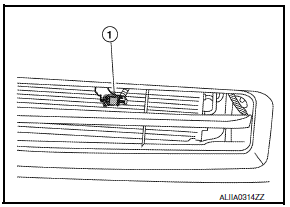
- From under the vehicle, disconnect the harness connector from the ambient sensor.
- Release the ambient sensor clip and remove the ambient sensor (1).
INSTALLATION
Installation is in the reverse order of removal.
 Control unit
Removal and Installation
A/C SWITCH ASSEMBLY
Removal
Remove cluster lid D. Refer to IP-10, "Exploded View".
Remove the A/C switch assembly from cluster lid D.
Installation
Instal ...
 In-vehicle sensor
Removal and Installation
REMOVAL
Remove the instrument lower panel LH. Refer to IP-19, "Removal and
Installation".
Remove the in-vehicle sensor screw and the in-vehicle sensor. ...
Other materials:
Rear Cross Traffic Alert (RCTA) (if so equipped)
WARNING
Failure to follow the warnings and instructions
for proper use of the RCTA system
could result in serious injury or death.
The RCTA system is not a replacement
for proper driving procedures and is not
designed to prevent contact with vehicles
or objects. When backing out of a
...
Driver Attention Alert system limitations
WARNING
Listed below are the system limitations for
the Driver Attention Alert system. Failure
to operate the vehicle in accordance with
these system limitations could result in
serious injury or death.
The Driver Attention Alert system may
not operate properly and may not provide
an alert i ...
General maintenance
During the normal day-to-day operation of the
vehicle, general maintenance should be performed
regularly as prescribed in this section. If
you detect any unusual sounds, vibrations or
smells, be sure to check for the cause or have a
NISSAN dealer do it promptly. In addition, it is
recommended ...
Nissan Maxima Owners Manual
- Illustrated table of contents
- Safety-Seats, seat belts and supplemental restraint system
- Instruments and controls
- Pre-driving checks and adjustments
- Monitor, climate, audio, phone and voice recognition systems
- Starting and driving
- In case of emergency
- Appearance and care
- Do-it-yourself
- Maintenance and schedules
- Technical and consumer information
Nissan Maxima Service and Repair Manual

0.011