
Nissan Maxima Service and Repair Manual: Seat cushion thermal electric device
Description
Provides cooling and heat for the seat cushion.
Component Function Check
1.CHECK SEAT CUSHION THERMAL ELECTRIC DEVICE FUNCTION
- Turn the climate controlled seat switch to the H (Heat) HI position and check that the seat cushion thermal electric device operates correctly.
- Turn the climate controlled seat switch to the C (Cool) HI position and check that the seat cushion thermal electric device operates correctly.
Diagnosis Procedure
Regarding Wiring Diagram information, refer to SE-44, "Wiring Diagram".
1.CHECK SEAT CUSHION THERMAL ELECTRIC DEVICE
Perform thermal electric device component inspection for the seat cushion. Refer to SE-16, "Component Inspection (Thermal Electric Device)".
2.CHECK SEAT CUSHION THERMAL ELECTRIC DEVICE CIRCUITS
- Turn ignition switch OFF.
- Disconnect seat cushion thermal electric device connector and climate controlled seat control unit connector B217.
- Check continuity between seat cushion thermal electric device connector B219 (A) terminals 1, 2 and climate controlled seat control unit connector B217 (B) terminals 26, 27.
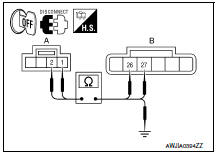
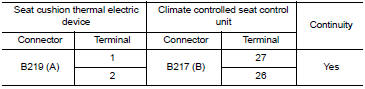
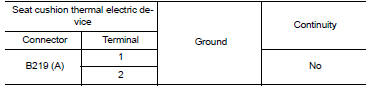
4. Check continuity between seat cushion thermal electric device connector B219 (A) terminals 1, 2 and ground.
3.CHECK SEAT CUSHION THERMAL ELECTRIC DEVICE SENSOR CIRCUITS
- Disconnect climate controlled seat control unit connector B212.
- Check continuity between seat cushion thermal electric device connector B219 (A) terminals 3, 4 and climate controlled seat control unit connector B212 (B) terminals 13, 14.
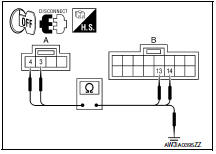
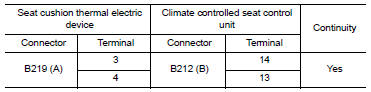
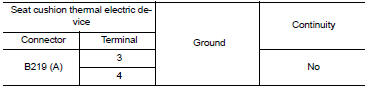
3. Check continuity between seat cushion thermal electric device connector B219 (A) terminals 3, 4 and ground.
Component Inspection (Thermal Electric Device)
1.CHECK THERMAL ELECTRIC DEVICE
- Turn ignition switch OFF.
- Disconnect thermal electric device connector.
- Measure the resistance of the thermal electric device between terminals 1 and 2.
NOTE:
The resistance value in the table below will change under any of the following conditions:
- air blowing across the thermal electric device
- changing the surrounding temperature of the thermal electric device
- measuring at other than 23C (73F)

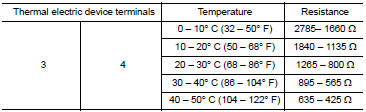
2.CHECK THERMAL ELECTRIC DEVICE SENSOR
Measure the resistance of the thermal electric device sensor between terminals 3 and 4.
 Climate controlled seat blower motor
Description
Sends airflow to the seat cushion and seatback.
Component Function Check
1.CHECK CLIMATE CONTROLLED SEAT BLOWER MOTOR FUNCTION
Turn the climate controlled seat switch to the H (Heat) L ...
 Seatback thermal electric device
Description
Provides cooling and heat for the seatback.
Component Function Check
1.CHECK SEATBACK THERMAL ELECTRIC DEVICE FUNCTION
Turn the climate controlled seat switch to the H (Heat) HI
...
Other materials:
Power supply and ground circuit
BCM (BODY CONTROL MODULE)
BCM (BODY CONTROL MODULE) : Diagnosis Procedure
1. CHECK FUSE AND FUSIBLE LINK
Check if the following BCM fuses or fusible link are blown.
2. CHECK POWER SUPPLY CIRCUIT
Turn ignition switch OFF.
Disconnect BCM.
Check voltage between BCM harness connector and ...
AMP on signal circuit
Description
When the audio system is turned on, a voltage signal is supplied from the AV
control unit to the BOSE speaker
amp. When this signal is received, the BOSE speaker amp. will turn on.
Diagnosis Procedure
1.CHECK AMP ON SIGNAL (BOSE SPEAKER AMP)
Turn audio system ON.
Check v ...
Servicing air conditioner
The air conditioner system in your NISSAN vehicle
is charged with a refrigerant designed with
the environment in mind.
This refrigerant does not harm the earth's
ozone layer.
Special charging equipment and lubricant is required
when servicing your NISSAN air conditioner.
Using improper refr ...
Nissan Maxima Owners Manual
- Illustrated table of contents
- Safety-Seats, seat belts and supplemental restraint system
- Instruments and controls
- Pre-driving checks and adjustments
- Monitor, climate, audio, phone and voice recognition systems
- Starting and driving
- In case of emergency
- Appearance and care
- Do-it-yourself
- Maintenance and schedules
- Technical and consumer information
Nissan Maxima Service and Repair Manual

0.0286